car logo Ford
car logo Volkswagen
car logo BMW
car logo Opel
car logo Audi
car logo Toyota
car logo Peugeot
English Русский
Български
Беларускі
Український
Српски
Hrvatski
Română
Polski
Slovenský
Magyar


Main
Freelander
Discovery
Range Rover
Defender
Contacts
Articles

Battery status (Defender 2007+)

 
  • Main
  • Defender
  • Defender 2007+
  • General information
  • Maintenance
  • Battery status
 
        0  
NOTE: The vehicle may be equipped with an alarm system and immobilizer. To prevent the alarm from being triggered, use the following procedure when disconnecting the battery.


1. Remove the driver's seat base.

2. Release the battery cover retaining clip.

3. Remove the battery cover.

4. Turn the ignition switch to position 'II' and then to position '0'.

5. Remove the ignition key.

NOTE: Always disconnect the ground cable first. When installing, connect the cable to the positive terminal first.


6. Disconnect the ground cable from the battery within 15 seconds.

7. The battery does not require maintenance, so topping up the electrolyte is not possible. There is an indicator on top of the battery. When the indicator shows:
  • GREEN COLOR - Battery charge is normal.
  • DARK COLOR (fading to black) - the battery needs charging.
  • TRANSPARENT (or light yellow) - the battery needs to be replaced. In this condition, do not charge the battery or jump start the engine from another vehicle.
  • If there is no green dot, the battery needs charging.

NOTE: If the indicator is clear or yellow, tap the indicator with a screwdriver handle to disperse any air bubbles. If the indicator color remains unchanged, the battery needs to be replaced.
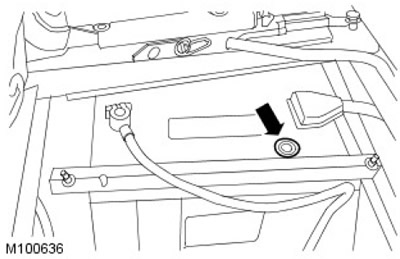

NOTE: If the indicator is clear or yellow, tap the indicator with a screwdriver handle to disperse…


8. Clean the battery terminals and wires and lubricate them with petroleum jelly.


9. Connect the wires to the battery (first to the positive terminal) and tighten the clamp bolts.

10. Install the battery cover and secure it with the clamp.

11. Install the driver's seat base.

Clean the battery terminals


1. Remove the driver's seat base.

2. Release the battery cover retaining clip. Remove the battery cover.
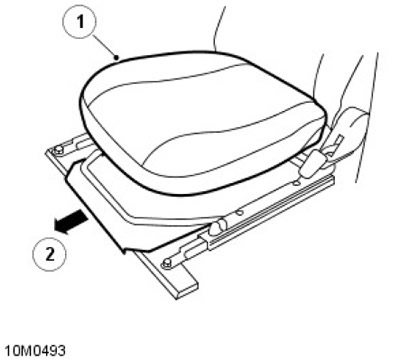
2. Release the battery cover retaining clip. Remove the battery cover.


3. Disconnect the wires from both battery terminals, ground wire first. Remove traces of corrosion and perform the neutralization procedure. Lubricate the terminals with technical petroleum jelly.

4. After completing maintenance, connect the wires to the battery terminals, positive wire first.
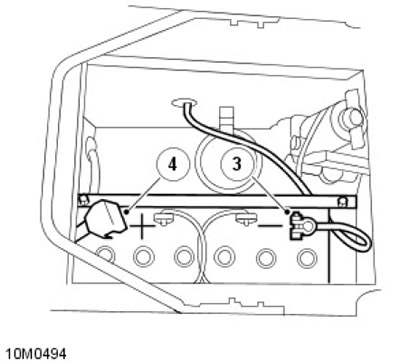
4. After completing maintenance, connect the wires to the battery terminals, positive wire first.


5. Install the battery cover and secure it with the clamp.

6. Install the driver's seat base.


This article is available at russian, bulgarian, belarusian, ukrainian, serbian, croatian, romanian, polish, slovak, hungarian
Article review: Saveliy Ushakov


Previous articles
Underhood space
Seats and seat belts
Lamps, horns and indicator lights
Windscreen wipers and washers

Current article
Battery status

Next articles
Remote control battery
Wheels
Tire pressure, condition and tread depth
Brake pads, calipers and discs
Wiring harnesses for wheel speed sensors
Fuel filter
Charge air cooler
Door locks and hinges


Similar articles from Land Rover repair manuals:
• Rechargeable battery Freelander 2 (2006-2014)
• Disconnecting the battery Freelander 1 (1997-2006)
• Battery powered battery Discovery 3 (2004-2009)
• Rechargeable battery Range Rover 3 (2001-2012)

Comments on this article


No comments yet


How much will 47 + 19 =


Defender 2007+ 
  • General information
  • Maintenance
  • Identification codes
  • Power unit
  • Diesel engine ID4 2.4L
  • Engine inspection
  • Engine cooling
  • Fuel supply
  • Fuel tank
  • Exhaust system
  • Accessory drive
  • Air filtration
  • Electronic parts
  • Mechanical gearbox
  • Transfer case
  • Clutch
  • Chassis
  • Car suspension
  • Wheels and tires
  • Steering
  • Steering column
  • Brake system
  • Front drive axle
  • Rear drive axle
  • Cardan shaft
  • Body and coating
  • Interior trim
  • Instrument panel and console
  • Exterior finish
  • Lockable body parts
  • Handles, locks, latches
  • Glass, frames and mechanisms
  • Windshield wipers and washers
  • Seats
  • Electrical equipment
  • Battery
  • Generator and regulator
  • Lighting and headlights
  • Winch
  • Heating and ventilation
  • Instrument panel
  • Other electronics


LRman.ru © 2013-2026 | Mobile version | Free Lander | Discovery | Range Rover | Defender | Contacts | | Sitemap |
Car repair and service instructions Land Rover: Freelander, Discovery, Range Rover, Defender
We use cookies to make pages load faster and provide a more user-friendly experience 🍪