car logo Ford
car logo Volkswagen
car logo BMW
car logo Opel
car logo Audi
car logo Toyota
car logo Peugeot
English Русский
Български
Беларускі
Український
Српски
Hrvatski
Română
Polski
Slovenský
Magyar


Main
Freelander
Discovery
Range Rover
Defender
Contacts
Articles

Gear selector lever (Range Rover 3)

 
  • Main
  • Range Rover
  • Range Rover 3
  • Power unit
  • Automatic gearbox GM-5L40-E
  • Gear selector lever
 
        0  
Contents: Dismantling ⇩ Assembly ⇩

Dismantling


1. Remove the center console.

CAR INTERIOR PARTS, REPAIR WORK, Center console.
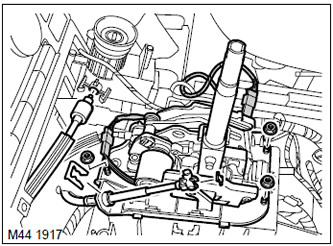

2. Disconnect the engine start interlock cable from the ignition switch housing.


2. Disconnect the engine start interlock cable from the ignition switch housing.

3. Remove the retainer securing the outer gear shift cable to the gear selector mechanism.

The original text can be found at [LRMAN.RU]

4. Loosen and remove the retainer securing the inner gear shift cable to the selector mechanism, remove the plastic spacers from the cable.

5. Disconnect the two connector blocks of the selector mechanism.

6. Unscrew the three nuts securing the selector mechanism and remove the selector mechanism.

Assembly


1. Install the selector mechanism on the bracket, install the mounting nuts and tighten them to a torque of 25 N·m.
2. Connect the connector to the selector mechanism connector.

3. Place the plastic spacers on the cable and connect the cable to the selector mechanism.

4. Connect the engine start interlock cable to the ignition switch housing.

5. Reinstall the center console.

CAR INTERIOR PARTS, REPAIR WORK, Center console.


This article is available at russian, bulgarian, belarusian, ukrainian, serbian, croatian, romanian, polish, slovak, hungarian
Article review: Platon Fedorov


Previous articles
Draining and filling the working fluid
Checking and adjusting the gear selector cable

Current article
Gear selector lever

Next articles
Gear selector lever handle
Assembling the gear selector lever and cable
Starter interlock switch
Gear selector shaft seal
Torque Converter Lock-Up Clutch Electromagnet
Gear shift solenoid
Electronic control unit
Solenoid valve wiring harness


Similar articles from Land Rover repair manuals:
• Adjusting the gear selector lever cable Freelander 2 (2006-2014)
• Gear Selector Rod Seal PG1 Freelander 1 (1997-2006)
• Selector lever illumination lamp (automatic transmission) Discovery 1 (1989-1998)
• Wheel alignment lever Discovery 3 (2004-2009)
• 1-2 and reverse gear selector shaft stoppers — removal and installation Defender 2007+ (2007-2016)

Comments on this article


No comments yet


How much will 30 + 11 =


Range Rover 3 
  • General information
  • Using the manual
  • Precautionary measures
  • Repair techniques
  • Identification codes
  • Specifications
  • Tightening torques
  • Materials
  • Maintenance
  • Power unit
  • Diesel engine TD6
  • Petrol engine V8
  • Emission reduction TD6
  • Emission reduction V8
  • Engine management TD6
  • Engine management V8
  • Fuel supply TD6 engine
  • Fuel supply V8 engine
  • Engine cooling TD6
  • Engine cooling V8
  • Exhaust system TD6
  • Exhaust system V8
  • Transfer case
  • Automatic gearbox GM-5L40-E
  • Automatic gearbox ZF 5HP24
  • Chassis
  • Drive shafts
  • Main gear
  • Front axle gear
  • Steering
  • Front suspension
  • Rear suspension
  • Brake system
  • Body and coating
  • Passenger safety
  • Doors and windows
  • Exterior details
  • Interior details
  • Glasses
  • Seats
  • Sunroof
  • Body geometry
  • Body repair
  • Corrosion protection
  • Electrical equipment
  • Heating and ventilation
  • Conditioning
  • Windshield wipers and washers
  • Starting and charging system
  • Lighting and headlights
  • Electronic blocks
  • Entertainment system
  • Wiring harnesses


LRman.ru © 2013-2026 | Mobile version | Free Lander | Discovery | Range Rover | Defender | Contacts | | Sitemap |
Car repair and service instructions Land Rover: Freelander, Discovery, Range Rover, Defender
We use cookies to make pages load faster and provide a more user-friendly experience 🍪