Contents: Disassembly ⇩ Assembly ⇩
Disassembly
1.
NOTE: *This procedure only applies to 110 models up to the following VIN numbers:
- 110 without ABS -638163
- 110 cABS -638248
Remove the differential assembly.
2. Secure the differential assembly in a vice or on a stand.
3. Knock out the cylindrical pins securing the adjusting nuts using the LRT 51-018/5 adjusting nut release tool.
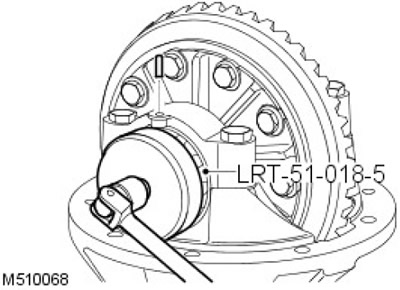
4. Mark the bearing caps to facilitate assembly.
5. Unscrew the bearing cap mounting bolts and remove the caps.
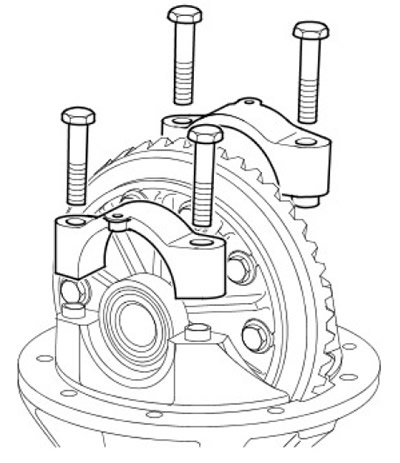
6. Remove the ring gear assembly and bearing outer races.
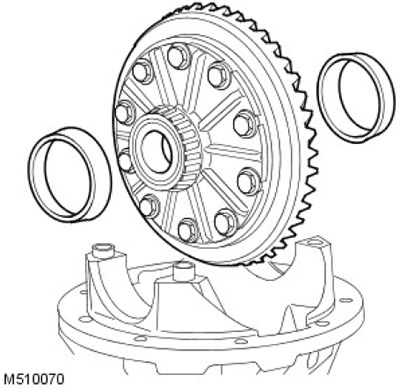
7. To facilitate assembly, mark the bearing outer races if the bearings are to be reused.
8. Using the LRT-51-003 tool to hold the pinion flange, remove the bolt and washer.
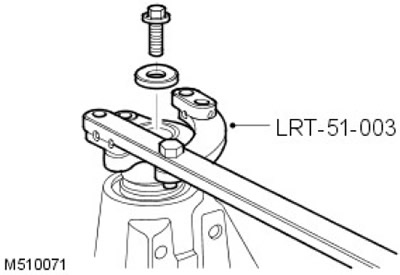
9.
Note: Older front differentials have a square flange and an additional spacer element. This remote element should be removed. On later versions of the front differential, there is a round flange, but there is no remote element.
Remove the final drive pinion flange.
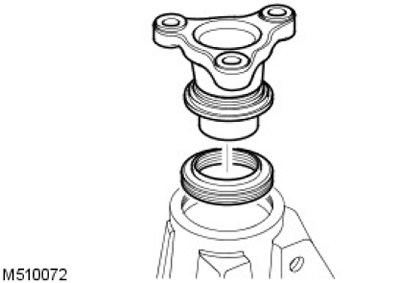
10.
CAUTION: Be careful not to damage the oil seal groove.
Using a lever, remove the gear oil seal.
11. Carefully remove the gear from the crankcase together with the rear bearing.
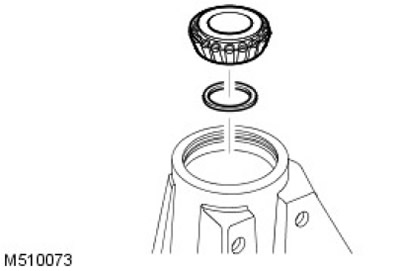
12. Remove the rear pinion bearing adjusting shim and record the adjusting shim size.
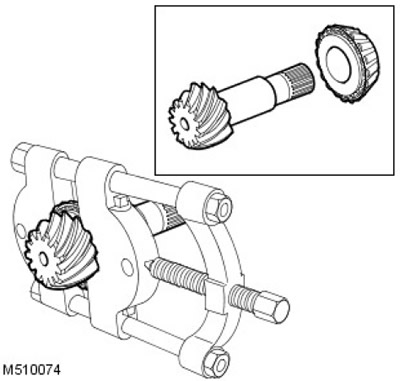
13. Using a puller, remove the front pinion bearing.
14. Remove the pinion bearing rings.
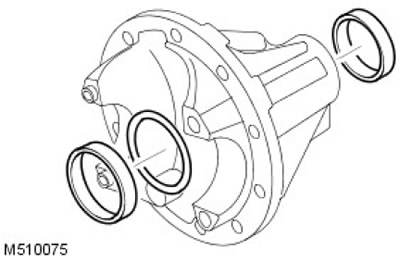
15. Remove the front pinion bearing adjusting shim and record the adjusting shim size.
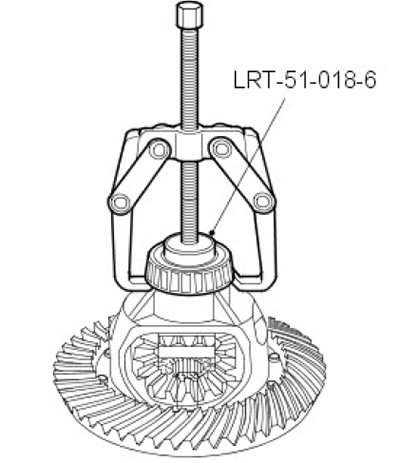
16. Using a two-jaw puller and LRT 51-018/6, remove the differential bearings.
17. Clamp the ring gear assembly in a vice.
18. Unscrew and discard the 10 bolts securing the crown gear to the planet carrier.
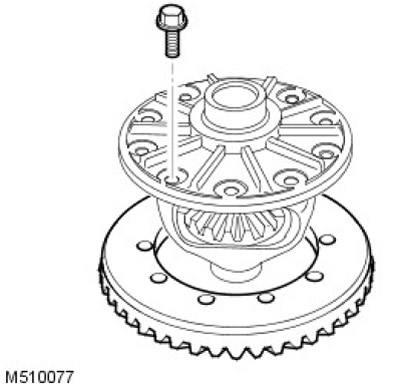
19. Carefully remove the crown gear from the carrier.
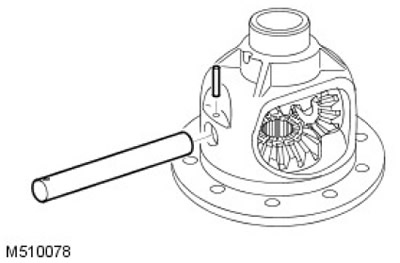
20.
NOTE: For vehicles with 4mm diameter roll pin.
Remove and discard the axle mounting cylindrical pin in the carrier and remove the axle.
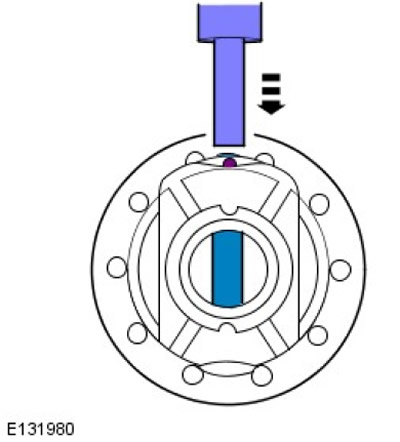
21.
NOTE: For vehicles with 6mm diameter roll pin.
Press out the cross shaft and cut off the pin. Secure the planetary gear housing in the press using suitable V-notch pads and press out the cross shaft.
22. Turn the gears towards the open part of the carrier and remove the satellites.
23.
NOTE: If the planetary gear housing has a 4mm diameter roll pin hole for the cross shaft, discard the planetary gear housing and replace it with a housing with a 6mm diameter roll pin hole.
Remove the sun gears.
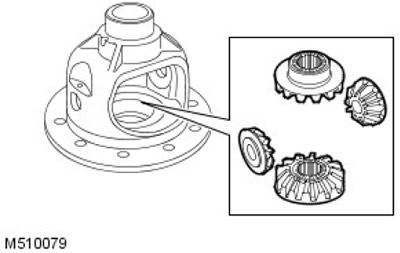
24. Clean and inspect all components for wear and damage.
Assembly
1. Install the satellites and rotate them to align the axle holes.
2. Install the axle, aligning the pin hole correctly.
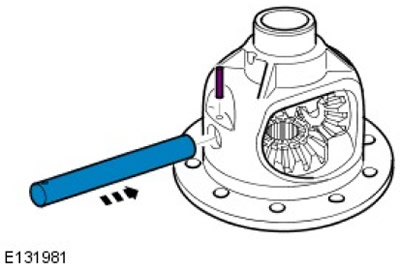
3.
NOTE: Press the roll pin completely into the planetary gear housing (after proper installation, approximately 8-10 mm will protrude from the housing).
Press the pin into the planetary gear housing.
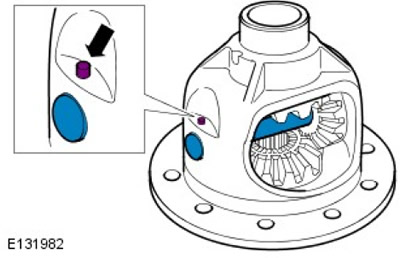
4. Secure the axle with a new cylindrical pin.
5. Install the crown gear into the planet carrier, screw in new bolts and tighten them to 60 Nm.
6. Clean and remove burrs from the original front bearing adjusting shim. Install it under the bearing race.
7. Clean the recesses of the pinion bearing outer race and remove any burrs. Using LRT 51-018-4, install the rear and front bearing races.
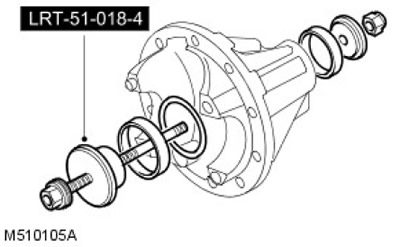
8. Install the front bearing onto the pinion gear.
9. Apply a thin layer of oil to the bearings.
10. Clean and remove burrs from the original rear bearing adjusting shim. Install under the bearing race.
11. Install the pinion gear and pinion rear bearing.
12. Install the pinion flange, washer and bolt.
13. Use LRT-51-003 to hold the gear flange.
14. Tighten the pinion flange bolt to 100 Nm.
15. Check the gear for axial clearance. If the reading is zero.
16. Rotate the gear several times to ensure that the bearings are in a stable position. Check the torque of the drive gear. The torque should be recorded when the gear is rotated. The torque of the drive gear should be 4 - 6 Nm.
17.
NOTE: To increase the turning torque, install a narrower spacer. To decrease the turning torque, install a wider spacer.
Adjust the rear bearing adjusting shim size to obtain the correct turning torque (approximately 0.025 mm = 1 Nm).
18. Mount the LRT-51-018/7 tool on a flat plate and zero the DTI reading.
19. Ensure that the gear height adjustment block, indicator and mating surfaces are clean and free of any irregularities.
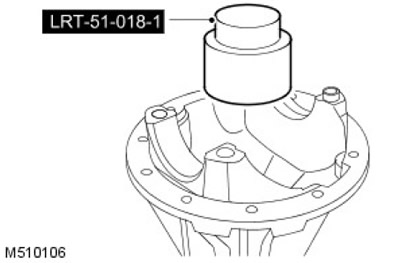
20. Install the LRT 51-018/1 adjustment block onto the gear head, correctly positioning it in the required position.
21.
CAUTION: The height of the adjustment block should be checked against the numbers indicated on the side of the block.
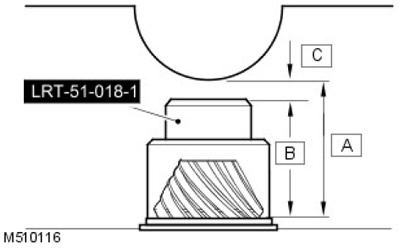
Gear Height Adjustment Procedure: 'C' = 'A' - 'B' Subtract nominal gear height 'A' from height of adjusting block 'B' (on the side of the adjustment block). Example: 74.390 - 73.130 = 1.26 mm Therefore, the gear head height reading is -1.260 mm ±0.025 mm.
- 1. 'A' = Nominal pinion height, 74.390.
- 2. 'B' = Height of the adjustment block.
- 3. 'C' = Head height.
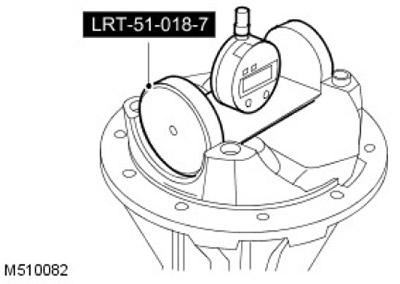
22. Install the LRT -51-018/7 indicator on the adjustment block and rock it to obtain the minimum reading. If the reading is lower than required, reduce the size of the adjustment shim. If the reading is higher than required, increase the size of the adjustment shim.
23. Using the LRT-51-003 tool to hold the pinion flange, remove the bolt and washer. Remove the final drive pinion flange.
24. Remove the pinion gear, rear bearing and rear bearing adjusting shim.
25. Remove the outer race and the adjusting shim of the front pinion bearing. Discard the adjusting shim. Clean the bearing ring recess and remove any burrs.
26. Install a shim of the required thickness and, using LRT 51-018/-4, install the front bearing outer race.
27. Install the pinion gear, rear bearing and rear bearing adjusting shim.
28. Install the pinion flange, washer and bolt. Using LRT-51-003 to hold the pinion flange, tighten the bolt to 100 Nm.
29. Turn the gear in both directions to ensure that the bearings are in a stable position.
30. Check the gear turning torque again and adjust if necessary.
31. Check the pinion head height again.
32. Using the LRT-51-003 tool to hold the pinion flange, remove the bolt and washer. Remove the final drive pinion flange.
33. Discard the bolt.
34. Using the LRT-51-010 tool, install the pinion seal.
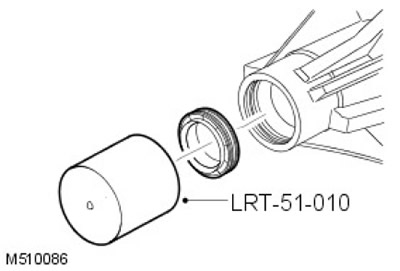
35. Install the spacer and rear bearing correctly.
36. Install the pinion gear, flange and washer.
37. Install the new pinion flange and tighten to 100 Nm.
38. Lightly lubricate the differential bearings.
39. Make sure the spring pins are located in the bearing caps.
40. Install the differential bearing outer races and install the differential assembly into the crankcase.
41. Install the bearing caps and tighten the bolts to 10 Nm.
42. Screw on the adjusting nuts, tighten the side nut of the crown gear to 22 Nm. Make sure that the opposite nut is loose.
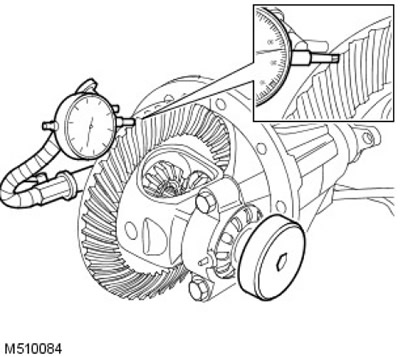
43. Install the DTI to check the ring gear backlash. Adjust the opposite nut to obtain the correct ring gear backlash.
44. Turn the gear in both directions to ensure that the bearings are in a stable position.
45.
NOTE: The ring gear side clearance should be within 0.076mm - 0.177mm.
Measure in three places to obtain the correct ring gear side clearance.
46. Align the slots on the adjusting nuts with the nearest pin hole. Do not loosen the nuts to align.
47. Tighten the bearing cap bolts to 90 Nm.
48. Secure the adjusting nuts with new cylinder pins.
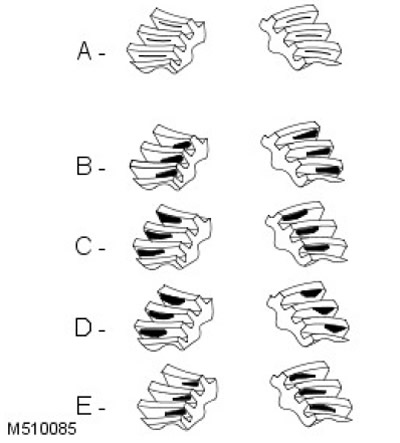
49. Apply special paint to the teeth of the crown gear to check the contact patch.
50.
NOTE: Apply assembly torque during cranking to check the contact patch. The total cranking torque should not exceed 10.85 Nm.
Rotate the gear several times to obtain a complete contact patch.
- 1. A = Normal Contact Patch: The contact patch on the driving gear should be centered on the gear teeth. The contact patch on the driven gear should be centered on the gear teeth, but may be offset toward the inside end of the tooth flank. There should be some clearance between the contact patch and the tip of the tooth.
- 2. B = Incorrect side clearance: Requires thinner shim.
- 3. C = Incorrect side clearance: Thicker shim required.
- 4. D = Incorrect pinion shim: Reduce backlash.
- 5. E = Incorrect pinion shim: Increase side clearance.
51. Install the differential assembly.
Comments on this article