car logo Ford
car logo Volkswagen
car logo BMW
car logo Opel
car logo Audi
car logo Toyota
car logo Peugeot
English Русский
Български
Беларускі
Український
Српски
Hrvatski
Română
Polski
Slovenský
Magyar


Main
Freelander
Discovery
Range Rover
Defender
Contacts
Articles

Front wheel speed sensor (Defender 2007+)

 
  • Main
  • Defender
  • Defender 2007+
  • Chassis
  • Brake system
  • Front wheel speed sensor
 
        0  
Contents: Removal ⇩ Installation ⇩

Removal


CAUTION: Do not replace the sensor without first removing, cleaning, reinstalling and retesting it.


1. Raise the vehicle on a 2-post lift.

2.
CAUTION: Do not replace the sensor without first removing, cleaning, reinstalling and retesting it.


Carefully remove the ABS sensor from the front hub.

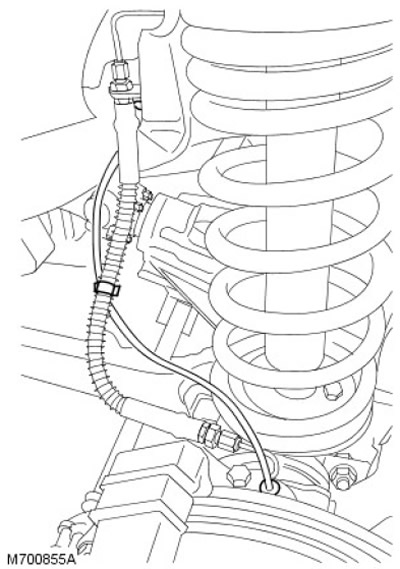
3. Release the clamp securing the ABS sensor wiring harness to the brake line.

4. Release the clamp securing the ABS sensor wiring harness to the inner fender.
[The material was taken from a website: www.LRman.ru]

4. Release the clamp securing the ABS sensor wiring harness to the inner fender.


5. Lower the vehicle.

6. Release the second clamp securing the ABS sensor wiring harness to the inner fender.

7. Disconnect the sensor electrical connector.

8. Remove the sensor wiring harness.
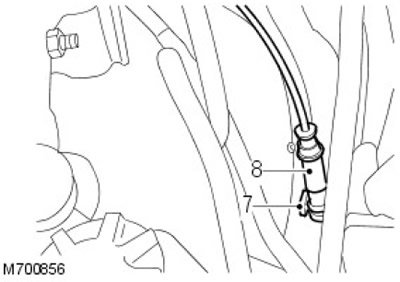
8. Remove the sensor wiring harness.


Installation


1. Connect the electrical connector of the sensor.

2. Install the sensor wiring harness and use the clamp to secure it to the inner fender.

3. Raise the car.

4. Use clamps to secure the wiring harness to the inner fender and to the brake line.

5. Apply grease to the sensor.

CAUTION: Clean the sensors thoroughly before installing them.


6. Carefully install the sensor onto the hub.

7. Lower the vehicle.


This article is available at russian, bulgarian, belarusian, ukrainian, serbian, croatian, romanian, polish, slovak, hungarian
Article review: Saveliy Ushakov


Previous articles
Brake system specification
Description and operating principle of the brake system
Bleeding the brake system
Master Brake Cylinder — Removal and Installation
Master Brake Cylinder — Disassembly and Assembly
Brake pressure control valve
Brake pedal and pedal bracket
Vacuum brake booster

Current article
Front wheel speed sensor

Next articles
Front disc brake
Front brake caliper
Front brake pads
Rear brake disc
Rear brake caliper 110/130
Rear brake caliper 90
Rear brake pads 110/130
Rear brake pads 90


Similar articles from Land Rover repair manuals:
• Front wheel speed sensor Freelander 2 (2006-2014)
• Front right wheel speed sensor and its electrical cable Freelander 1 (1997-2006)
• Front wheel speed sensor Discovery 3 (2004-2009)
• ABS Front Wheel Speed Sensor Range Rover 3 (2001-2012)

Comments on this article

Николай
30.12.2025
23:24
Датчик-то как снимать? не провод, а сам датчик? и как глубоко его ставить при установке - может быть, там упор есть какой-то?
answer quote


How much will 16 + 25 =


Defender 2007+ 
  • General information
  • Maintenance
  • Identification codes
  • Power unit
  • Diesel engine ID4 2.4L
  • Engine inspection
  • Engine cooling
  • Fuel supply
  • Fuel tank
  • Exhaust system
  • Accessory drive
  • Air filtration
  • Electronic parts
  • Mechanical gearbox
  • Transfer case
  • Clutch
  • Chassis
  • Car suspension
  • Wheels and tires
  • Steering
  • Steering column
  • Brake system
  • Front drive axle
  • Rear drive axle
  • Cardan shaft
  • Body and coating
  • Interior trim
  • Instrument panel and console
  • Exterior finish
  • Lockable body parts
  • Handles, locks, latches
  • Glass, frames and mechanisms
  • Windshield wipers and washers
  • Seats
  • Electrical equipment
  • Battery
  • Generator and regulator
  • Lighting and headlights
  • Winch
  • Heating and ventilation
  • Instrument panel
  • Other electronics


LRman.ru © 2013-2026 | Mobile version | Free Lander | Discovery | Range Rover | Defender | Contacts | | Sitemap |
Car repair and service instructions Land Rover: Freelander, Discovery, Range Rover, Defender
We use cookies to make pages load faster and provide a more user-friendly experience 🍪