car logo Ford
car logo Volkswagen
car logo BMW
car logo Opel
car logo Audi
car logo Toyota
car logo Peugeot
English Русский
Български
Беларускі
Український
Српски
Hrvatski
Română
Polski
Slovenský
Magyar


Main
Freelander
Discovery
Range Rover
Defender
Contacts
Articles

Front brake pad wear sensor (Range Rover 3)

 
  • Main
  • Range Rover
  • Range Rover 3
  • Chassis
  • Brake system
  • Front brake pad wear sensor
 
        0  
Contents: Dismantling ⇩ Assembly ⇩

Dismantling


1. Raise the front of the vehicle on one side.

CAUTION: Do not work under a vehicle supported solely by a jack or lift. Always support the vehicle with safety stands.


2. Remove the left front wheel.
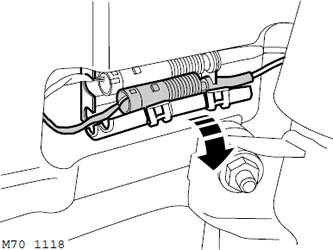
3. Open the cover covering the sensor cable connector, release the connector and disconnect the…


3. Open the cover covering the sensor cable connector, release the connector and disconnect the wear sensor connector.
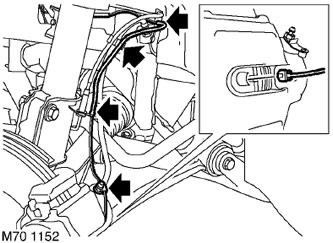
4. Release the sensor cable from the body clips, brake hose and the cap covering the bleed nipple.


4. Release the sensor cable from the body clips, brake hose and the cap covering the bleed nipple.

5. Disconnect the wear sensor from the brake pad.

6. Remove the wear sensor.

Assembly


1. Install the wear sensor on the brake pad.

2. Fix the wear sensor cable to the bleeder cap retainer, brake hose bracket, retainer and bracket on the car body, then connect the cable connector to the connector and fix the connector. Close the connector cover.


3. Replace the wheel and tighten the nuts to a torque of 140 Nm.

4. Remove the supports and lower the vehicle.

The full version is available on the website [LRman.ru]


This article is available at russian, bulgarian, belarusian, ukrainian, serbian, croatian, romanian, polish, slovak, hungarian
Article review: Platon Fedorov


Previous articles
Checking the wear and runout of the front brake disc
Checking the wear and runout of the rear brake disc
Bleeding the brake system
Adjusting the parking brake
Front brake disc
Rear brake disc
Pre-pressure pump
Brake system reservoir

Current article
Front brake pad wear sensor

Next articles
Rear brake pad wear sensor
Rear drum brake pads
Pneumatic booster assembly
Vacuum pump TD6
Electronic control unit ABS
ABS Front Wheel Speed Sensor
Rear wheel speed sensor
ABS pressure regulator unit


Similar articles from Land Rover repair manuals:
• Front parking brake cable Freelander 2 (2006-2014)
• Front Oxygen Sensor Freelander 1 (1997-2006)
• Front interior parking assistance sensor Discovery 3 (2004-2009)
• Brake pads (front wheels) Discovery 1 (1989-1998)
• Front wheel speed sensor Defender 2007+ (2007-2016)

Comments on this article


No comments yet


How much will 28 + 29 =


Range Rover 3 
  • General information
  • Using the manual
  • Precautionary measures
  • Repair techniques
  • Identification codes
  • Specifications
  • Tightening torques
  • Materials
  • Maintenance
  • Power unit
  • Diesel engine TD6
  • Petrol engine V8
  • Emission reduction TD6
  • Emission reduction V8
  • Engine management TD6
  • Engine management V8
  • Fuel supply TD6 engine
  • Fuel supply V8 engine
  • Engine cooling TD6
  • Engine cooling V8
  • Exhaust system TD6
  • Exhaust system V8
  • Transfer case
  • Automatic gearbox GM-5L40-E
  • Automatic gearbox ZF 5HP24
  • Chassis
  • Drive shafts
  • Main gear
  • Front axle gear
  • Steering
  • Front suspension
  • Rear suspension
  • Brake system
  • Body and coating
  • Passenger safety
  • Doors and windows
  • Exterior details
  • Interior details
  • Glasses
  • Seats
  • Sunroof
  • Body geometry
  • Body repair
  • Corrosion protection
  • Electrical equipment
  • Heating and ventilation
  • Conditioning
  • Windshield wipers and washers
  • Starting and charging system
  • Lighting and headlights
  • Electronic blocks
  • Entertainment system
  • Wiring harnesses


LRman.ru © 2013-2026 | Mobile version | Free Lander | Discovery | Range Rover | Defender | Contacts | | Sitemap |
Car repair and service instructions Land Rover: Freelander, Discovery, Range Rover, Defender
We use cookies to make pages load faster and provide a more user-friendly experience 🍪