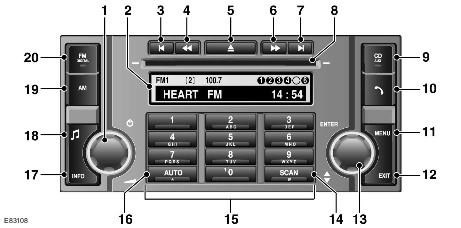
| Pos. | Spare part number | Name |
| 1 | - | On/Off/Volume Control |
| 2 | - | Information display |
| 3 | - | Go back/to previous entry |
| 4 | - | Manually tune back/to previous CD track |
| 5 | - | Ejecting CD |
| 6 | - | Manually tune forward/to the next CD track |
| 7 | - | Skip forward/to next entry |
| 8 | - | CD tray |
| 9 | - | MODE button |
| 10 | - | Telephone mode button |
| 11 | - | Audio system menu button |
| 12 | - | Exit button |
| 13 | - | Rotary control of the audio system menu |
| 14 | - | Scan button |
| 15 | - | Keyboard |
| 16 | - | Autosave button |
| 17 | - | INFO button |
| 18 | - | Sound and volume settings button |
| 19 | - | AM frequency range button |
| 20 | - | FM frequency range button |
The "high-end" audio system is based on the integrated audio module (IAM), which is connected to the other components via the MOST bus. The ICM module is connected to the other components via the medium-speed CAN bus and the MOST bus.
IAM provides the following functions:
- Radio
- CD player (single CD or six-CD changer)
- Additional input jack (for any device with a 3.5mm plug)
ICM is activated via the CAN bus. IAM is activated via the MOST bus.
The ICM is the master subscriber of the MOST bus and contains the MOST system synchronizer.
Comments on this article