Contents: General information about the Global…⇩ Location of navigation system…⇩ Navigation system control diagram ⇩ Location of navigation system…⇩ Navigation system control diagram…⇩ Touch screen ⇩ C2819 connector contacts ⇩ C2820 connector contacts ⇩ C2823 connector contacts ⇩ C2825 connector contacts ⇩ Navigation system computer ⇩ C2114 connector contacts ⇩ C2113 connector contacts ⇩ C1599 connector contacts ⇩ GPS Antenna ⇩ Traffic Management Channel (TMC)…⇩ VICS receiver for receiving messages…⇩ VICS Infrared Antenna ⇩ Operation of the navigation system ⇩ Road navigation ⇩ Off-road navigation ⇩ 4x4 l ⇩ Traffic Management Message Channel…⇩ Vehicle Information and…⇩ Transmission via radio frequency…⇩ Transmission via infrared channel ⇩ FM data transmission ⇩ Diagnostics ⇩ TSD Display Diagnostics ⇩ Diagnostics of the navigation system…⇩ DTC (diagnostic trouble code)…⇩
General information about the Global Positioning System (GPS)
The system designed to determine the current location of the vehicle is called the GPS system. (global positioning system). The system uses Earth satellites owned by the US Department of Defense. 24 satellites orbit the Earth every 12 hours at an altitude of 20,000 km, and at any time from 5 to 11 satellites are in the line of sight. The orbits are inclined to the Earth's equatorial plane by 55° to ensure coverage of the polar regions. Each satellite sends out radio signals that completely determine the satellite's coordinates: longitude, latitude, altitude, as well as the date and the exact time of day, which is generated by onboard atomic clocks. Each satellite has four atomic clocks.
To accurately determine the three coordinates of the current position in space, the car must receive signals from at least four satellites.
If the car is moving, this information is constantly changing. The navigation system computer determines which satellites are in the field of view and calculates their relative positions. Using this information, the computer compensates for deviations in the position of the satellites, which increases the accuracy of the car's positioning.
Signals used by the GPS system (global positioning system), are called precise positioning signals (Precision positioning signal - PPS).
The predicted accuracy of PPS is:
- 22 meters horizontally
- 27.7 meters vertical
- The time measurement error is 200 nanoseconds.
To determine the position of the car, the system uses reference data. Reference data refers to data on the current state of 24 satellites in Earth orbit.
The navigation system's computer determines which satellites are in the field of view and calculates their relative positions. Using this information, the computer compensates for deviations in the satellites' positions, which increases the accuracy of the vehicle's positioning. In order to accurately calculate the three coordinates of the current position in space, the navigation system must receive reference data from at least four satellites. As the vehicle moves, the computer constantly updates this information, so the computer has the vehicle's exact position in space at any given time.
Location of navigation system components
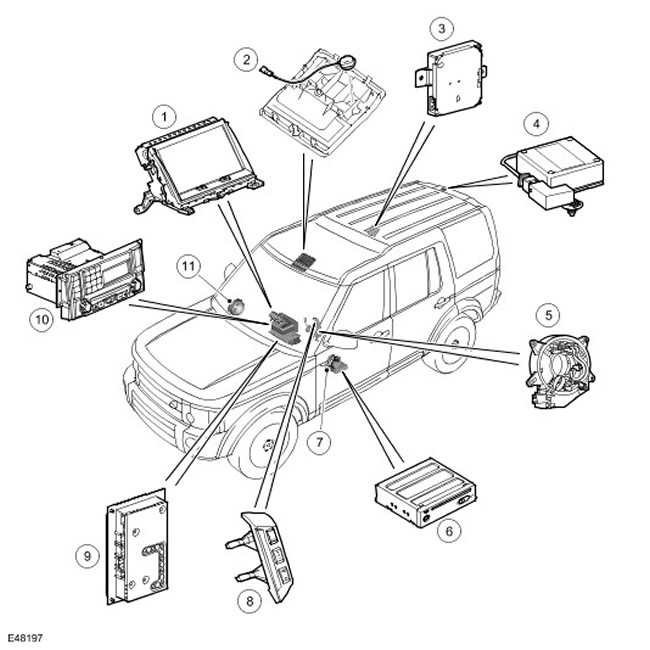
| Item name | Spare part catalog number | Description |
| 1 | - | Touch Screen Display (TSD) |
| 2 | - | Microphone |
| 3 | - | Traffic Management Message Receiver (TMC) (if any) |
| 4 | - | GPS Antenna (global positioning system) |
| 5 | - | Movable contact group |
| 6 | - | Navigation system computer |
| 7 | - | Speaker |
| 8 | - | Steering wheel controls |
| 9 | - | Audio amplifier |
| 10 | - | Integrated Head Unit (IHU) |
| 11 | - | Speaker |
Navigation system control diagram
NOTE: A = Wired connection D = CAN (local area network of controllers) P = MOST Q = GVIF
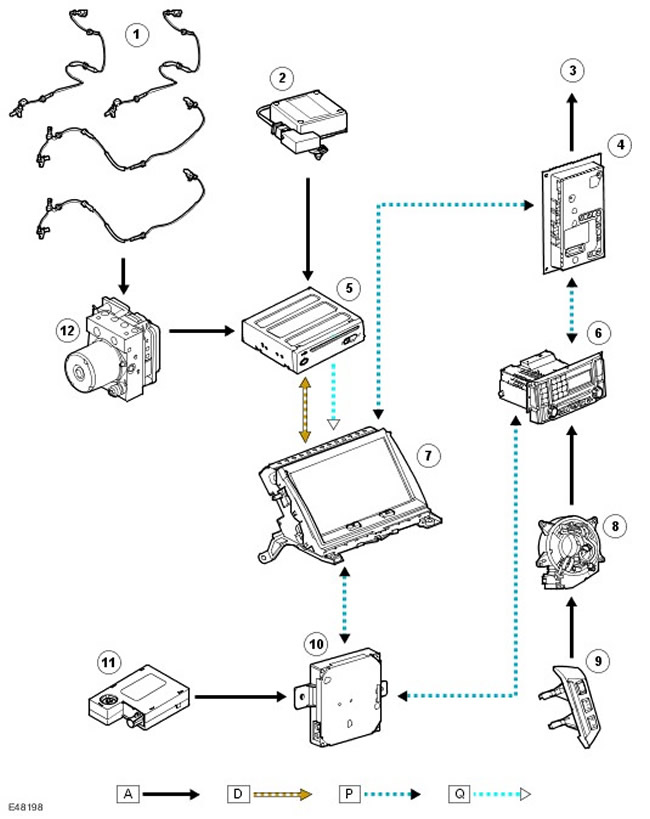
| Item name | Spare part catalog number | Description |
| 1 | - | Wheel speed sensors |
| 2 | - | GPS Antenna (global positioning system) |
| 3 | - | Speakers |
| 4 | - | Audio amplifier |
| 5 | - | Navigation system computer |
| 6 | - | Integrated Head Unit (IHU) |
| 7 | - | Touch Screen Display (TSD) |
| 8 | - | Movable contact group |
| 9 | - | Steering wheel controls |
| 10 | - | Traffic Management Message Receiver (TMC) (if any) |
| 11 | - | Traffic Management Message (TMC) Receiver Antenna Amplifier |
| 12 | - | ABS module (anti-lock braking system) |
Location of navigation system components with VICS (for Japan only)
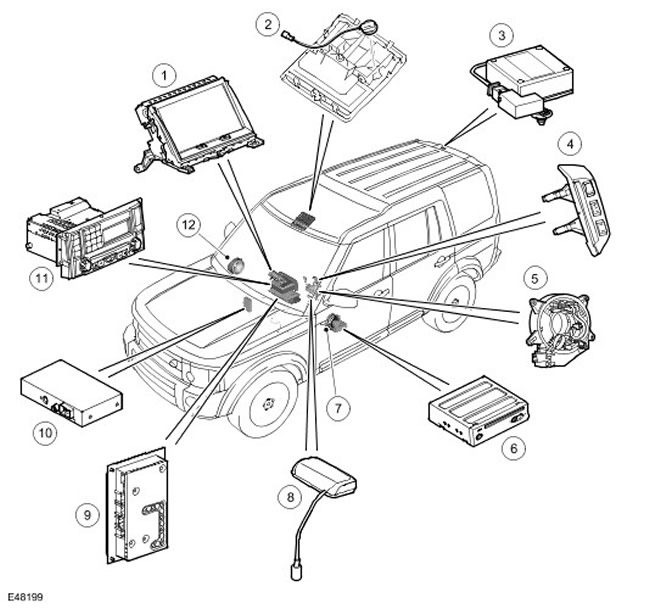
| Item name | Spare part catalog number | Description |
| 1 | - | Touch Screen Display (TSD) |
| 2 | - | Microphone |
| 3 | - | GPS Antenna (global positioning system) |
| 4 | - | Steering wheel controls |
| 5 | - | Movable contact group |
| 6 | - | Navigation system computer |
| 7 | - | Speaker |
| 8 | - | VICS Antenna |
| 9 | - | Audio amplifier |
| 10 | - | VICS Receiver |
| 11 | - | Integrated Head Unit (IHU) |
| 12 | - | Speaker |
Navigation system control diagram with VICS (for Japan only)
NOTE: A = Wired connection; D = CAN (); P = MOST; Q = GVIF;
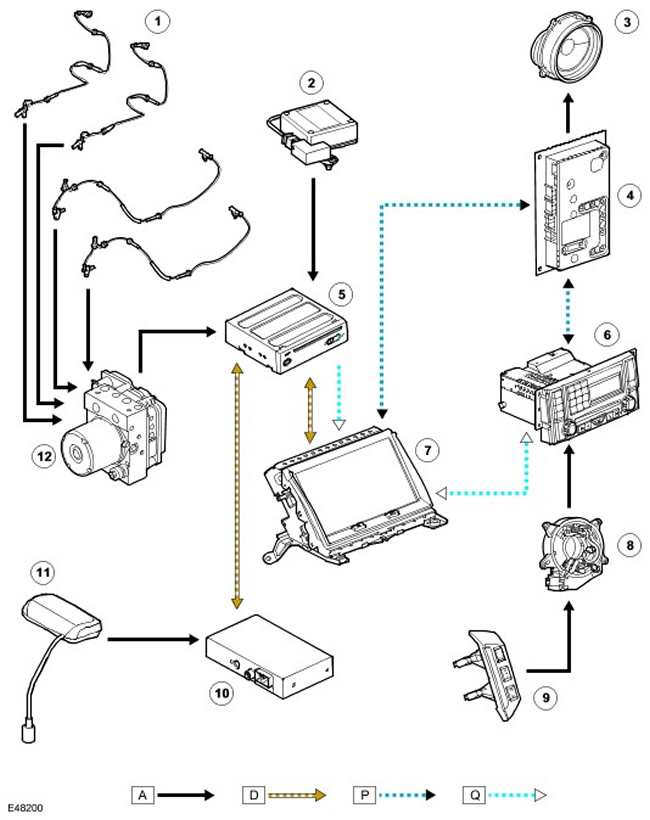
| Item name | Spare part catalog number | Description |
| 1 | - | Wheel speed sensors |
| 2 | - | GPS Antenna (global positioning system) |
| 3 | - | Speakers |
| 4 | - | Audio amplifier |
| 5 | - | Navigation system computer |
| 6 | - | Integrated Head Unit (IHU) |
| 7 | - | Touch Screen Display (TSD) |
| 8 | - | Movable contact group |
| 9 | - | Steering wheel controls |
| 10 | - | VICS Receiver |
| 11 | - | VICS Antenna |
| 12 | - | ABS module (anti-lock braking system) |
The navigation system includes the following components:
- Touch Screen Display (TSD)
- Navigation system computer
- GPS Antenna (global positioning system)
- Traffic Management Message Channel (TMC)
- A system for receiving messages from infrared and radio transmitters installed along the road (VICS, Japan only)
Touch screen
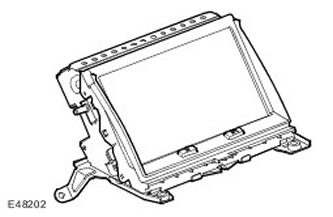
The Touch Screen Display (TSD) is located in the center of the instrument panel. The TSD is a VGA touchscreen liquid crystal display with a resolution of 800 x 480 pixels and a 15:9 aspect ratio. The TSD is connected to the MOST infotainment system. The MOST system is a fiber-optic data bus that provides high-speed transmission of control commands and audio signals within the system. For more information, please contact the Communications Network (418-00 Module Communications Network). For more information, please refer to Audio System (415-01 Audio Unit). For more information, please contact Video System (415-07 Video System)
The TSD processes its own video signals, but all graphical navigation information comes from the navigation computer via a dedicated GVIF bus. (Gigabit Video Interface). For more information, please contact the Communications Network (418-00 Module Communications Network)
C2819 connector contacts
| Contact No. | Description | Input signal/output signal |
| 1 | Battery voltage | Input signal |
| 2 | Weight | - |
| 3 | Weight | - |
| 6 | Audio screen mode | - |
| 7 | (-) sound signal | - |
| 11 | ACC (auxiliary equipment) | Input signal |
| 12 | Signal to reduce brightness of the lighting | Input signal |
| 14 | Dedicated CAN bus () (high level) | - |
| 15 | Dedicated CAN bus () (low level) | - |
| 17 | (+) sound signal | Input signal |
C2820 connector contacts
| Contact No. | Description | Input signal/output signal |
| 1 | Video screen mode | - |
C2823 connector contacts
| Contact No. | Description | Input signal/output signal |
| 1 | (+) GVIF | Input signal |
| 2 | (-) GVIF | - |
| 3 | Shielding of GVIF bus | - |
C2825 connector contacts
| Contact No. | Description | Input signal/output signal |
| 1 | MOST input matching connector | Input signal |
| 2 | MOST output matching connector | Output signal |
Navigation system computer
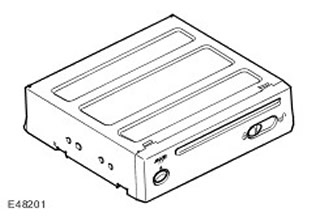
The navigation system computer is located under the left front seat. The computer is the main unit in the navigation system and receives input signals from the ABS unit. (anti-lock braking system) and GPS antennas (global positioning system). The navigation computer has a semiconductor piezoelectric gyro sensor that measures the vehicle's movement along the vertical axis. The gyro sensor operates on the principle of the Coriolis force. The Coriolis force is the force that occurs to accelerate bodies moving from the axis of rotation in the direction of the axis' rotation. Using signals from the ABS unit (anti-lock braking system), GPS antennas (global positioning system) and a gyro sensor, the computer calculates the current position, direction and speed of the vehicle.
The navigation computer also has a DVD drive ((digital universal disc)) -ROM ((in read-only memory)). The drive is used to read map data from DVD ((universal digital disc)) - a disc intended for a specific region (1 DVD ((digital universal disc)) for each of the following regions: EU, US, Japan and Australia). The button located next to the DVD slot ((digital universal disc)), is used to unload DVDs ((digital universal disc)) from the unit. If the ignition is on or the infotainment system is in one-hour mode, the DVD ((digital universal disc)) - the disc is ejected by pressing the button once.
GPS receiver (global positioning system) receives information from one to eight satellites at a given time. This information is received by the GPS antenna (global positioning system). Built-in GPS receiver (global positioning system) used to calculate the position (i.e. longitude, latitude and altitude), direction and speed of movement.
To save the settings and configuration data when the system is turned off, the navigation computer uses a non-volatile memory device. Memorization is performed immediately before turning off.
CAUTION: If the device is turned off before the infotainment system is turned off, the computer will not save the data properly. This means that personal settings may be lost.
For the Japanese market, the navigation computer is a slightly different device. Despite the identical appearance, the software is adapted exclusively for Japan, and the part numbers are different. The system also uses additional devices for the VICS system. (receiver and antenna). The VICS system is equipped with receivers that allow the vehicle to receive traffic information from transmitters located along the road and to change the navigation system's instructions accordingly. VICS information is received both via radio and infrared communication. For this reason, the antenna is located on the inside of the windshield.
The navigation computer is connected to the touchscreen display (TSD) via a dedicated CAN bus () and a separate Gigabyte Video Interface Flow (GVIF) line. The GVIF bus carries all video information to the TSD, and the CAN bus () carries commands and data to and from the TSD.
C2114 connector contacts
| Contact No. | Description | Input signal/output signal |
| 3 | Weight | - |
| 6 | Dedicated CAN bus () (low level) | Input signal/output signal |
| 8 | VICS Receiver H-GND (Ground) | Input signal |
| 9 | VICS H-TX Receiver | Input signal |
| 14 | Lots of sound signals for voice control and navigation system | - |
| 15 | Microphone shielding mass | - |
| 16 | (-) voice recognition microphone | - |
| 17 | Battery voltage 12V (fuse 49) | Input signal |
| 18 | 12V Battery Power Supply from Infotainment Relay | Input signal |
| 19 | Weight | - |
| 21 | Vehicle speed signal from ABS control module (anti-lock braking system) | Input signal |
| 22 | Dedicated CAN bus () (high level) | Input signal/output signal |
| 30 | (+) sound signals of voice control and navigation system | Output signal |
| 31 | Shielding/ground for voice control and navigation system audio signals | - |
| 32 | (+) voice recognition microphone | Input signal |
C2113 connector contacts
| Contact No. | Description | Input signal/output signal |
| 1 | (+) GVIF | Output signal |
| 2 | (-) GVIF | - |
| 3 | GVIF mass | - |
C1599 connector contacts
| Contact No. | Description | Input signal/output signal |
| 1 | GPS Antenna Shielding Weight (global positioning system) | Output signal |
| 2 | GPS Antenna Signal (global positioning system) | Input signal |
GPS Antenna
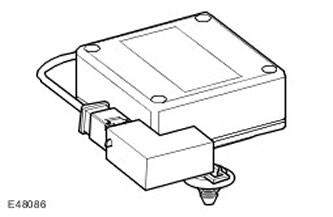
GPS Antenna (global positioning system) is located in the rear spoiler. GPS antenna (global positioning system) connected to computer GPS (global positioning system) one coaxial cable, receives signals from GPS satellites (global positioning system) and transmits them to a receiver built into the computer.
There is a possibility that the GPS antenna (global positioning system) may lose GPS signal (global positioning system) from GPS satellites (global positioning system) in mountainous or densely wooded areas, in areas with tall buildings, multi-storey car parks, garages, tunnels, bridges, and during heavy rain/thunderstorms. In this case, the navigation system continues to operate until communication is restored, based only on the information recorded on the DVD ((digital universal disc)).
Traffic Management Channel (TMC) Receiver
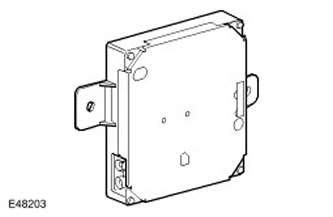
The TMC receiver is located in the rear RH (right) part of the luggage compartment. The receiver is connected to the MOST network and transmits traffic information to the navigation computer via TSD. The navigation computer then displays this information on the display and changes the recommended route to avoid areas with heavy traffic. TMC data is received by the FM antenna built into the glass of the luggage compartment door via the antenna amplifier located above the spoiler of the luggage compartment door. For more information, refer to Antenna (415-02 Antenna)
The TMC function is provided in models supplied to the markets of many European countries.
VICS receiver for receiving messages from infrared and radio transmitters installed along the road (for Japan only)
The VICS system includes the following elements:
- VICS Receiver
- VICS Infrared Antenna
- VICS Radio Antenna
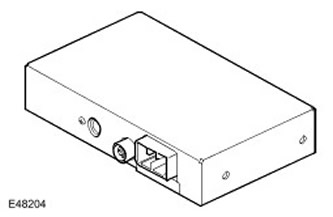
The VICS receiver is located behind the integrated head unit (IHU) in the instrument panel. The VICS receiver is connected to the navigation computer via a dedicated line.
The VICS receiver receives information from an antenna located in the center of the instrument panel and from an antenna built into the rear window. For more information, refer to Antenna (415-02 Antenna)
VICS Infrared Antenna
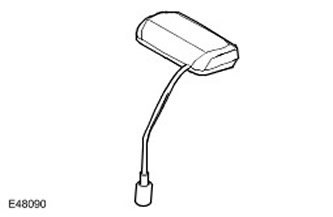
The VICS infrared antenna is mounted on top of the control panel. The antenna receives infrared and radio frequency signals from transmitters installed along the road.
Operation of the navigation system
The navigation system receives GPS information (global positioning system) from satellites via GPS antenna (global positioning system). Based on GPS signals (global positioning system), received from the satellites, the navigation system computer calculates the position of the car. After the driver enters the desired destination, the navigation system computer calculates the route based on the driver's preset preferences or "default" settings stored in the computer.
The navigation system is activated by a button located in the lower left corner of the touchscreen. The driver can select on-road or off-road navigation mode.
Road navigation
This navigation mode is activated after the driver specifies the destination. This can be done in the following ways:
- By entering data manually or by selecting an address on the TSD screen.
- Entering postal code.
- Select a destination previously entered in the address book.
- Select a destination from the displayed area.
(Original article on the web portal: «LRMAN.RU»)
After the driver enters the destination, the system suggests the route to the driver by "scrolling" the map of the area on the screen and giving voice instructions. The shape and scale of the map output on the screen can be changed.
Off-road navigation
This navigation mode indicates a sequence of terrain points that must be passed one after another. First, the system indicates the route step by step to the first route point. When the car arrives at the first point, the system leads the driver to the second route point. This process continues until the car arrives at the destination.
The routes are stored in the permanent memory of the navigation system computer.
Routes can be displayed on the touchscreen display with waypoints, latitude and longitude of the destination, as well as previously saved routes.
Various display formats provide the driver with the information required for direct, step-by-step navigation to their destination. (route selection guide mode). The same screen formats are available even without recommendations (compass mode). However, in this case, the route selection guidance information is not displayed on the screen. When the system is in the compass driving mode, when the route selection guidance information is not displayed, the message is displayed "COMPASS MODE" (compass mode).
4x4 l
The 4x4 system l provides the driver with additional information about the vehicle systems.
- Suspension travel
- Selected gear
- Selected range
- Type of road surface
- Car course
- Azimuth
- Steering wheel angle
Traffic Management Message Channel (TMC)
Traffic Message Channel (TMC) is one of the functions of FM (radio data transmission system) broadcasting in the RDS range (frequency modulation). The system transmits real-time traffic and weather messages. The data is received and decoded by the TMC receiver and sent to the navigation system, which forwards it further via its interface. TMC messages are filtered in the navigation system computer, so only messages relevant to the current trip are displayed. This allows the navigation system to adjust the route in time and offer the driver an alternative route to avoid emergency situations.
The traffic service messaging system complies with global standards that are approved by traffic information collecting organizations, information service providers, radio stations, and car radio manufacturers. TMC information is received using a conventional FM antenna.
All TMC radios use a single list of event codes, but local databases (on a disk with road maps) may additionally contain country-specific codes for strategic European roads.
Currently, TMC information is broadcast in most European countries.
Vehicle Information and Communication System VICS (for Japan only)
The VICS system supplies the navigation system computer with information that can be used to change the recommended route or warn the driver about traffic conditions near the vehicle's location. Information is supplied to the system via three channels:
- radio frequency channel;
- infrared channel;
- fM multi-channel transmission channel.
Transmission via radio frequency channel
Radio frequency transmission is usually carried out from transmitters ("radio beacons") installed along roads, mainly on high-speed highways. The following information is transmitted:
- Traffic density
- Travel time to the next intersection
- Traffic conditions in adjacent areas and the possibility of exiting the motorway
- Road accidents
- Speed Limit
- Rules for changing lanes
- Rules of movement within the lane
- Parking admissibility and availability of parking areas on highways
Transmission via infrared channel
Infrared transmissions are transmitted by radio beacons installed along major roads. The following information is transmitted:
- Traffic density and travel time
- Road accidents
- Accidents
- Lane restrictions due to road works
- Parking availability
FM data transmission
FM data transmission is broadcast as part of the normal FM data transmission of the RDS system. (radio data transmission system). The following information is transmitted:
- Traffic density and travel time (covers a large area)
- Road accidents, road works, speed limits and lane changing rules (covers a large area)
- Parking availability information.
Diagnostics
The touch screen and navigation computer perform self-diagnostics, allowing the mechanic to find faults in the system. Diagnostic codes can be read using the T4 device.
TSD Display Diagnostics
Built-in diagnostic functions allow you to identify errors in the operation of the touch screen. The mechanic can test the system for the following points:
- Hardware Key Operation
- Touchscreen functions
- Video input
- RGB Image
- Video signals
- Self-diagnosis
- System configuration
- Vehicle configuration
- MOST bus operation
- After turning on the system, enter the main menu.
- Press the top center of the screen for about 5 seconds, then press the navigation system hardware key.
- The Diag PIN Entry window will appear, enter the access code 753.
- Once the system accepts the code, a diagnostic menu will appear on the screen.
Checking the display hardware keys
The test is carried out to check the functionality of two hardware keys built into the touch screen. If the key is working properly, when you press the corresponding icon on the screen, the latter will be displayed on a green background.
Testing the touch screen
By entering the touch screen test mode, the mechanic can check the screen's response to touch. He can either check the screen's functionality or recalibrate it. After pressing the key "Touch Check Switch" (Testing Touch Switches) the screen will be clear. When you touch the screen anywhere, the coordinates of the corresponding point are displayed. If you touch a faulty area of the screen, the coordinates will not be displayed on the screen.
Calibrating the screen will ensure that the coordinates of the touch points correspond. To do this, you need to press on different "target" points on the screen.
Signals from vehicle systems
The Vehicle Signals window on the TSD displays input signals from other vehicle systems. These include:
- Battery voltage
- Lighting (on or off)
- Outside light sensor voltage
- Reduced brightness of instrument lighting
- Distribution of output audio signals
- PCB block temperature
- Speed limit (on or off)
- MOST bus FOT temperature
- Parking position (electric parking brake engaged or disengaged)
- PWM signal duty cycle (pulse width modulation) screen backlight
- Sound signal volume
- Sound signal timbre
Checking video inputs
This function allows you to test the video inputs of the touch display. These include the TV/DVD inputs ((digital universal disc)) (television, connection with DVD player) rear Seat Entertainment (RSE) system.
Checking RGB colors
This function allows the mechanic to check the colors generated by the touch screen. Six monochrome colors are displayed on the screen. Selecting any of them results in the screen being filled with the selected color. Touching the screen again returns it to the color selection mode.
Self-diagnosis
The self-diagnosis function displays the current fault codes of the touch screen. In addition, the ignition switch status and battery voltage are displayed.
Two additional on-screen keys allow you to clear fault codes and check the TSD.
System configuration
The screen displays information about the touchscreen and the navigation computer. Switching between the two components is done using the screen key in the upper LH (left) corner of the screen.
The following information is available:
- type of car
- component serial number
- component catalog number
- component group number
- main Processor Bootloader Version
- version of the main computer software
- version of additional computer software
- dedicated CAN bus database version ()
Vehicle configuration
Selecting the Vehicle Configuration option allows the mechanic to check which infotainment components are installed in the vehicle. This option is arranged over four screens, which can be navigated using the Forward and Back buttons.
Checking the MOST bus
The MOST bus test screen displays information about the signals transmitted on this loop bus. When using any part of the audio system, a message transmitted on the MOST bus appears on the screen. This allows you to identify faults associated with this data bus.
Diagnostics of the navigation system computer
Built-in diagnostic functions allow you to identify errors in the operation of the navigation computer. The mechanic can test the system according to the following points:
- information about the navigation system
- information about system components
- manual check
- self-diagnosis
- After turning on the system, enter the navigation system menu by pressing the hardware button of the navigation system.
- Agree to cancel the screen.
- Enter the main menu of the navigation system.
- Press and hold the top center of the touch screen for a while.
- The Diag PIN Entry window will appear, enter the access code 753.
- information about the navigation system
- manual check
- information about system components
- Self-diagnosis
Navigation information
This menu item has three subsections:
- Video signals
- GPS information (global positioning system)
- Reset position
Information about system components
When you select this option, the system will provide information about software components and versions.
Manual check
The menu provides the ability to perform the following tests:
- Checking the RGB colors of the navigation system screen.
- Checking the microphone input level.
- Checking the output signals of the voice message system.
Self-diagnosis
Self-diagnosis consists of an internal check of the navigation system computer's functionality with the display of error codes on the touch screen.
DTC (diagnostic trouble code) navigation system
| DTC output (diagnostic trouble code) | DescriptionDTC (diagnostic trouble code) | Possible cause of the malfunction |
| U1A0087 | Dedicated CAN bus failure () | Disconnection of connector from navigation computer. Communication error. |
| B1B0049 | Internal navigation computer error | |
| B1A0049 | Internal TSD failure | |
| B1A8911 | gPS antenna short circuit (global positioning system) on mass | GPS connection error (global positioning system) |
| B1A8913 | GPS antenna circuit broken (global positioning system) | GPS connection error (global positioning system) |
| B1D6287 | Communication error with VICS controller | |
| B1D6249 | VICS controller error | |
| U1A0131 | GVIF Error | No connection with GVIF |
| U300068 | Overheating FOT MOST | MOST transceiver overheating |
| B100E25 | TV/RSE video input failure | No connection at input |
| B100F25 | Combined camera video input failure | No connection at input |
| B101025 | Rear camera video signal failure | No connection at input |
| U200531 | Vehicle speed signal malfunction | Vehicle speed and GPS data discrepancy (global positioning system) |
Comments on this article