Contents: Initial connection of a mobile phone…⇩ Bluetooth Selection ⇩ Calling a subscriber ⇩ Voice recognition ⇩ Steering wheel controls ⇩
Compatible Bluetooth® mobile phones can work with the built-in telephone system of the vehicle. The connection must be made with the ignition on or the engine running.
Initial connection of a mobile phone to the vehicle system
To prepare your mobile phone for connection to the system, refer to the phone manufacturer's instructions or use the standard commands provided in the vehicle owner's manual table.
Once the handset is successfully connected to the on-board system, the Bluetooth option will appear in the on-screen phone menu.
Bluetooth Selection
Up to 5 mobile phones can be registered in the vehicle's memory.
After turning on the ignition, the car searches for 5 previously registered mobile phones, starting with the last one. Before making a new connection, wait 30 seconds for this process to complete.
Calling a subscriber
Please refer to your vehicle owner's manual.
Voice recognition
Your Bluetooth® phone does not support voice recognition.; for information on recognizing voice commands in other vehicle systems, see Voice Command Recognition (up to 2009 model year).
Steering wheel controls
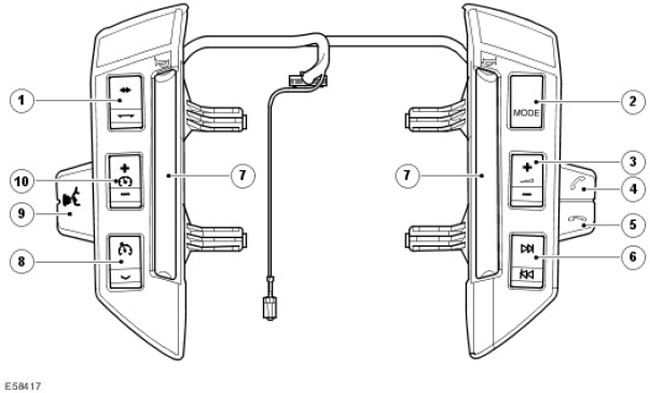
(The article is based on information from the website LRman.ru)
| Item name | Spare part catalog number | Description |
| 1 | Adaptive Cruise Control Distance Control Switches | |
| 2 | Audio mode switch | |
| 3 | Sound volume control | |
| 4 | Call key | |
| 5 | End call key | |
| 6 | Increase/decrease the volume of the audio system | |
| 7 | Sound signal | |
| 8 | Turn on/off speed control/set speed | |
| 9 | Voice recognition system switch (navigation system only) | |
| 10 | Speed control system speed controller |
The switches on the steering wheel allow the driver to perform the following functions:
- receiving an incoming call;
- end call.
Comments on this article