Contents: Removal ⇩ Installation ⇩
Removal
1. Remove the right lower rear side trim panel.
For more information, refer to Rear Side Trim Panel (76.13.12)
2.
CAUTION: Cover the fiber optic connections to prevent dust from entering them.; avoid bending fiber optic cables within a radius of less than 30 mm.
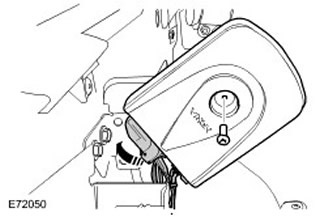
Remove the cell phone module.
- Remove the Torx head bolt.
- Disconnect the two electrical connectors.
(The article was copied from this resource LRman.ru)
Installation
1. Install the cell phone module.
- Connect the electrical connectors.
- Tighten the Torx head bolt (tightening torque 10 Nm).
For more information, refer to Rear Side Trim Panel (76.13.12)
3. Configure the new module using WDS.
Comments on this article