Contents: Removal ⇩ Installation ⇩
Removal
1.
CAUTION: After turning off the ignition, wait 2 minutes before disconnecting the battery. Failure to observe the 2-minute pause may result in damage to the navigation system computer.
Disconnect the ground cable from the battery. For more information, refer to Specification.
2. Remove the instrument panel console. For more information, refer to Instrument Panel Console (76.25.03)
3.
CAUTION: Cover the fiber optic connections to prevent dust from entering them.; avoid bending fiber optic cables within a radius of less than 30 mm.
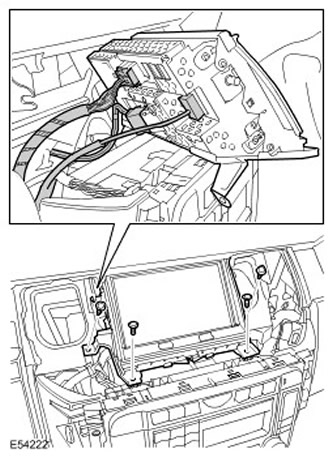
Remove the navigation system display module.
- Remove 4 Torx head bolts.
- Disconnect the fiber optic cable connector.
- Disconnect the two electrical connectors.
Installation
1. Install the navigation system display module.
- Connect the electrical connectors.
- Connect the fiber optic cable connector.
- Tighten the Torx head screws.
Data taken from the website: lrman.ru
3. Connect the ground cable to the battery. For more information, refer to Specification.
Comments on this article