car logo Ford
car logo Volkswagen
car logo BMW
car logo Opel
car logo Audi
car logo Toyota
car logo Peugeot
English Русский
Български
Беларускі
Український
Српски
Hrvatski
Română
Polski
Slovenský
Magyar


Main
Freelander
Discovery
Range Rover
Defender
Contacts
Articles

Device and technical description of the video system (Discovery 3)

 
  • Main
  • Discovery
  • Discovery 3
  • Electrical equipment
  • Information system
  • Device and technical description of the video system
 
        0  
Contents: Location of video system components ⇩ Location of video system components ⇩ TV ⇩ Television receiver ⇩ Contacts of the C2117 connector of…⇩ Third Row Audio Remote Controls ⇩

Location of video system components
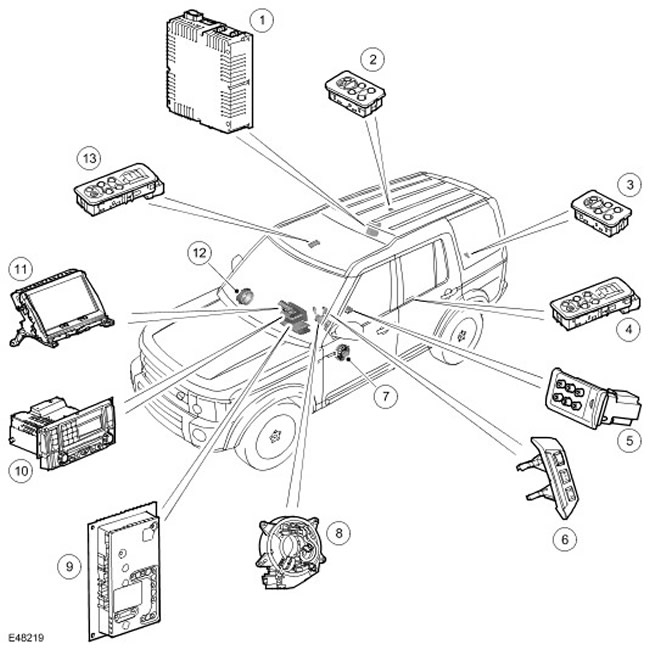

Location of video system components


Item nameSpare part catalog numberDescription
1-TV receiver module
2-Remote control for audio system third row seats, RH (right)
3-Remote control for audio system, third row of seats, LH (left)
4-Remote control for audio system (second row of seats, Lh (left))
5-Audio and video system input and output panel
6-Steering wheel controls
7-Speaker
8-Movable contact group
9-Audio amplifier
10-Integrated audio head unit
11-Touch Screen Display (TSD)
12-Speakers
13-Remote control for audio system (second row of seats, Rh (right))

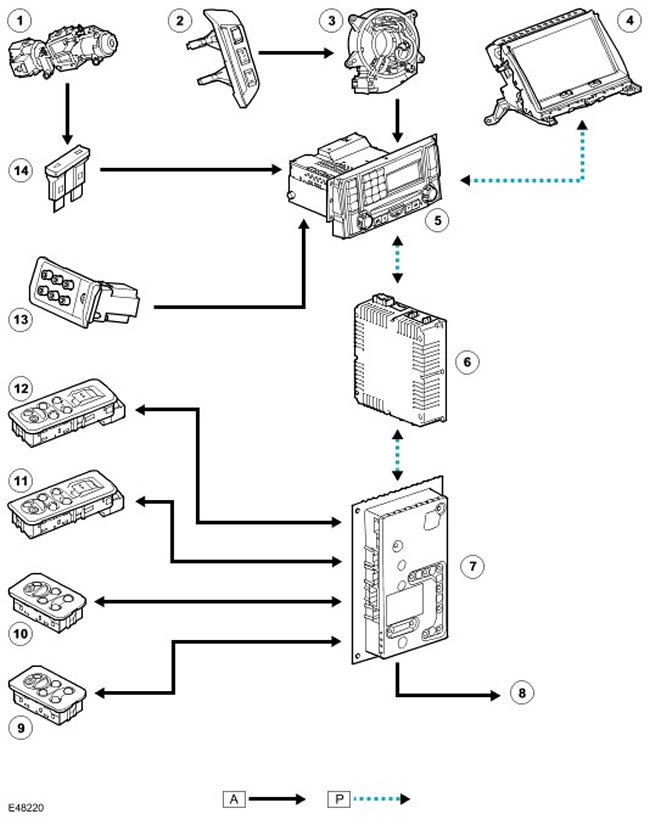
Location of video system components


Location of video system components


Item nameSpare part catalog numberDescription
1-Ignition switch
2-Steering wheel controls
3-Movable contact group
4-Touch Screen Display (TSD)
5-Integrated Head Unit (IHU)
6-Television receiver
7-Amplifier
8-Speakers
9-Rear Door Audio Remote Control/Headphone Socket
10-Rear Door Audio Remote Control/Headphone Socket
11-Rear Door Audio Remote Control/Headphone Socket and Power Window Switch
12-Rear Door Audio Remote Control/Headphone Socket and Power Window Switch
13-Audio and video system panel
14-Fuse


The video system includes the following components:
  • Front screen (touch screen navigation system, TSD)
  • TV receiver module
  • TV antennas
  • Headphone modules for rear seat passengers

TV


The TV system receives TV signals from antennas in the rear side windows. The antennas are connected to the TV receiver via a coaxial cable. For more information, refer to Antenna (415-02)

Television receiver
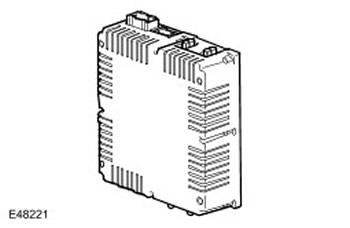

Television receiver


The TV receiver module is located in the right rear of the luggage compartment (right) The TV receiver is connected to the rest of the video system via the MOST bus. Audio and control signals are sent via the MOST bus and video signals are sent to the touch screen display (TSD) via a coaxial cable. For more information, contact Communications Network (418-00)

The sound of the TV programmes can be transmitted through the car speakers or listened to through headphones intended for rear passengers. The sound can also be heard while the car is moving, but the picture disappears as soon as the car starts moving.

Contacts of the C2117 connector of the TV receiver module


Contact No.DescriptionInput signal/output signal
1Not used-
2Not used-
3Not used-
4Video signalInput signal
5Video signal-
6Not used-
7Not used-
8Not used-
9Video signalOutput signal
10"Mass" of video signal-
11"Mass" of video signal-
12Not used-
13NutritionInput signal


Third Row Audio Remote Controls


Third Row Audio Remote Controls


Passengers in the second and third rows of seats can listen to programs from any source installed in the car using regular headphones. These sources include:
  • TV
  • CD (compact disc)
  • Radio
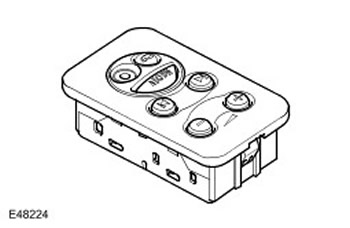
The car has four remote controls for the audio system: two remotes in the rear doors, combined with the window switches, and two in the rear of the cargo area, on each side of the third-row seats.

Audio remote controllers allow the user to select the source to listen to. The remote control does not change the source selected on the head unit. If the head unit is playing a CD (compact disc), rear passengers cannot operate the CD player (compact disc).

Using the audio system remote control, you can change the headphone volume, skip to the next/previous track or set CD repeat play (compact disc), change to another radio station or tune up/down your radio or television receiver.


This article is available at russian, bulgarian, belarusian, ukrainian, serbian, croatian, romanian, polish, slovak, hungarian
Article review: Saveliy Ushakov


Previous articles
Diagnostics and testing of the audio system
The device and technical description of the audio system
Removal and installation the audio unit
Removal and installation the audio system amplifier
The device and technical description of antennas and amplifiers
The device and technical description of the speakers
Rear side body panel speaker
Rear door speaker

Current article
Device and technical description of the video system

Next articles
Diagnostics and testing of the video system
Removal and installation a DVD video player
Removal and installation the display


Similar articles from Land Rover repair manuals:
• Removal and installation the video system display Freelander 2 (2006-2014)
• Safety precautions when working with the airbag system Range Rover 3 (2001-2012)
• Filling and bleeding the power steering system Defender 2007+ (2007-2016)

Comments on this article


No comments yet


How much will 14 + 25 =


Discovery 3 
  • General information
  • Using the manual
  • Precautionary measures
  • Service Information
  • Technique
  • Health protection
  • Road test
  • Identification codes
  • Jacking and lifting
  • Maintenance - diesel
  • Maintenance - petrol
  • Chassis
  • Suspension
  • Front suspension
  • Rear suspension
  • Wheels and tires
  • Dynamic suspension
  • Cardan shaft
  • Rear drive axle
  • Front drive axle
  • Front axle axles
  • Rear axle axles
  • Brake system
  • Parking brake
  • Hydraulic brake
  • Vacuum brake booster
  • Anti-lock braking system
  • Steering
  • Steering column
  • Power unit
  • Petrol engine 4.0L
  • Petrol engine 4.4L
  • Diesel engine 2.7L
  • Engine cooling
  • Fuel supply
  • Drive units
  • Launch system
  • Ignition system
  • Emission reduction
  • Air filtration
  • Fuel vapor control
  • Electronic control part
  • Car gearbox
  • Clutch
  • All-wheel drive systems
  • Transfer case
  • Exhaust system
  • Fuel tank and lines
  • Acceleration control
  • Electrical equipment
  • Climate control
  • Instruments and control lamps
  • Battery and charging system
  • Information system
  • Lighting and headlights
  • Power distribution
  • Electronic Function Group
  • Body and coating
  • Body elements
  • Interior and body trim
  • Mirrors and glasses
  • Seats
  • Instrument panel and console
  • Handles and locks
  • Windshield wipers and washers
  • Sunroof and bumpers
  • Safety system
  • Body repairs
  • Repair of front end elements
  • Repair of back elements
  • Side panel repair
  • Frame and body mount

Discovery 1 
  • General information
  • Technical specifications
  • Introduction to manual
  • Troubleshooting
  • Power unit
  • Diesel engine Tdi
  • Petrol engine V8i (3.9 l)
  • Petrol engine V8i (4.0 l)
  • Petrol engine Mpi
  • Reducing harmful emissions
  • Fuel system Tdi
  • Fuel system MFi
  • Fuel system SFi
  • Fuel system MPi (MEMS)
  • Cruise control
  • Cooling system (Tdi)
  • Cooling system (V8i)
  • Cooling system (MPi)
  • Exhaust system
  • Transmission
  • Clutch
  • Manual gearbox R380
  • Manual gearbox LT 77
  • Transfer case LT230T
  • Automatic gearbox
  • Cardan shaft
  • Rear axle
  • Front axle
  • Chassis
  • Steering system
  • Front suspension
  • Rear suspension
  • Brake system
  • Wheels and tires
  • Body and interior
  • Passive safety
  • Doors, locks and windows
  • Exterior body parts
  • Interior trim details
  • Seats
  • Electrical equipment
  • Heating and ventilation
  • Air conditioning
  • Windscreen wipers
  • Starting and charging system
  • Equipment and devices
  • Lighting and headlights


LRman.ru © 2013-2026 | Mobile version | Free Lander | Discovery | Range Rover | Defender | Contacts | | Sitemap |
Car repair and service instructions Land Rover: Freelander, Discovery, Range Rover, Defender
We use cookies to make pages load faster and provide a more user-friendly experience 🍪