car logo Ford
car logo Volkswagen
car logo BMW
car logo Opel
car logo Audi
car logo Toyota
car logo Peugeot
English Русский
Български
Беларускі
Український
Српски
Hrvatski
Română
Polski
Slovenský
Magyar


Main
Freelander
Discovery
Range Rover
Defender
Contacts
Articles

Parking brake indicators (Discovery 3)

 
  • Main
  • Discovery
  • Discovery 3
  • Chassis
  • Parking brake
  • Parking brake indicators
 
        0  
Contents: Yellow parking brake indicator ⇩ Red parking brake indicator ⇩ Text messages ⇩
Parking brake indicators


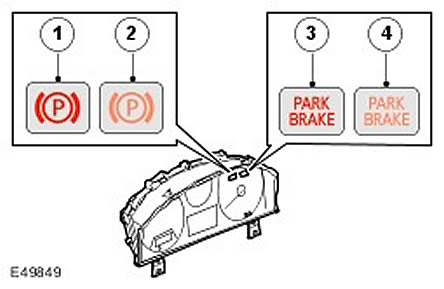
Item nameSpare part catalog numberDescription
1Red indicator (excluding vehicles for the North American market)
2Yellow indicator (excluding vehicles for the North American market)
3Red indicator (for North American market vehicles only)
4Yellow indicator (for North American market vehicles only)

The parking brake has two indicators, yellow and red, which are located on the speedometer on the instrument panel.

Yellow parking brake indicator


The yellow parking brake indicator lights up continuously if there is a fault with the parking brake system. The indicator is controlled by a signal transmitted from the parking brake control unit to the instrument cluster via the high-speed CAN bus. (local area network of controllers).

Red parking brake indicator


When the parking brake is applied, the red parking brake indicator light stays on continuously when the ignition is on and for 3 minutes after the ignition is turned off. If the system is unable to execute the on or off command due to a malfunction, the indicator light flashes.


The original article is located on the website www.LRman.ru

When the ignition is on and the indicator is not flashing, the system is controlled by a signal transmitted via the high-speed CAN bus. (controller network). When the ignition is off or the indicator is flashing, the system is controlled by a signal transmitted from the parking brake control unit to the instrument cluster via a permanent wire connection.

Text messages


On vehicles with a high-level instrument cluster, a fault will not only cause the indicators to illuminate, but will also display a text message in the message center display. For more information, refer to the Information and Message Center (413-08).


This article is available at russian, bulgarian, belarusian, ukrainian, serbian, croatian, romanian, polish, slovak, hungarian
Article review: Saveliy Ushakov


Previous articles
Parking brake specification
Location of units and parts
Parking brake switch
Drum brakes
Parking brake cables
Emergency release rope
Clutch Pedal Position Sensor

Current article
Parking brake indicators

Next articles
Parking brake control unit
How the parking brake works
Handbrake control diagram
Inspection and check of the handbrake
DTC Trouble Code Index
Running-in of parking brake pads
Adjusting the parking brake pads and linings
Parking brake shoes


Similar articles from Land Rover repair manuals:
• Parking brake control Freelander 2 (2006-2014)
• Parking brake release indicator switch Freelander 1 (1997-2006)
• Parking brake indicator switch Range Rover 3 (2001-2012)
• Parking brake switch Defender 2007+ (2007-2016)

Comments on this article


No comments yet


How much will 25 + 24 =


Discovery 3 
  • General information
  • Using the manual
  • Precautionary measures
  • Service Information
  • Technique
  • Health protection
  • Road test
  • Identification codes
  • Jacking and lifting
  • Maintenance - diesel
  • Maintenance - petrol
  • Chassis
  • Suspension
  • Front suspension
  • Rear suspension
  • Wheels and tires
  • Dynamic suspension
  • Cardan shaft
  • Rear drive axle
  • Front drive axle
  • Front axle axles
  • Rear axle axles
  • Brake system
  • Parking brake
  • Hydraulic brake
  • Vacuum brake booster
  • Anti-lock braking system
  • Steering
  • Steering column
  • Power unit
  • Petrol engine 4.0L
  • Petrol engine 4.4L
  • Diesel engine 2.7L
  • Engine cooling
  • Fuel supply
  • Drive units
  • Launch system
  • Ignition system
  • Emission reduction
  • Air filtration
  • Fuel vapor control
  • Electronic control part
  • Car gearbox
  • Clutch
  • All-wheel drive systems
  • Transfer case
  • Exhaust system
  • Fuel tank and lines
  • Acceleration control
  • Electrical equipment
  • Climate control
  • Instruments and control lamps
  • Battery and charging system
  • Information system
  • Lighting and headlights
  • Power distribution
  • Electronic Function Group
  • Body and coating
  • Body elements
  • Interior and body trim
  • Mirrors and glasses
  • Seats
  • Instrument panel and console
  • Handles and locks
  • Windshield wipers and washers
  • Sunroof and bumpers
  • Safety system
  • Body repairs
  • Repair of front end elements
  • Repair of back elements
  • Side panel repair
  • Frame and body mount

Discovery 1 
  • General information
  • Technical specifications
  • Introduction to manual
  • Troubleshooting
  • Power unit
  • Diesel engine Tdi
  • Petrol engine V8i (3.9 l)
  • Petrol engine V8i (4.0 l)
  • Petrol engine Mpi
  • Reducing harmful emissions
  • Fuel system Tdi
  • Fuel system MFi
  • Fuel system SFi
  • Fuel system MPi (MEMS)
  • Cruise control
  • Cooling system (Tdi)
  • Cooling system (V8i)
  • Cooling system (MPi)
  • Exhaust system
  • Transmission
  • Clutch
  • Manual gearbox R380
  • Manual gearbox LT 77
  • Transfer case LT230T
  • Automatic gearbox
  • Cardan shaft
  • Rear axle
  • Front axle
  • Chassis
  • Steering system
  • Front suspension
  • Rear suspension
  • Brake system
  • Wheels and tires
  • Body and interior
  • Passive safety
  • Doors, locks and windows
  • Exterior body parts
  • Interior trim details
  • Seats
  • Electrical equipment
  • Heating and ventilation
  • Air conditioning
  • Windscreen wipers
  • Starting and charging system
  • Equipment and devices
  • Lighting and headlights


LRman.ru © 2013-2026 | Mobile version | Free Lander | Discovery | Range Rover | Defender | Contacts | | Sitemap |
Car repair and service instructions Land Rover: Freelander, Discovery, Range Rover, Defender
We use cookies to make pages load faster and provide a more user-friendly experience 🍪