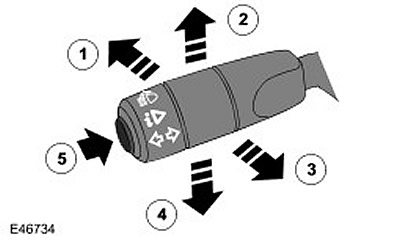
| Item name | Spare part catalog number | Description |
| 1 | - | High beam |
| 2 | - | Right turn signal |
| 3 | - | High beam headlights alarm |
| 4 | - | Left turn signal |
| 5 | - | Computer Functions Button |
The turn signal switch assembly is mounted on the left side of the housing and is secured to it with two screws. The switch is connected to the main wiring harness via a connector, which is located on the back of the switch. The switch controls the following functions:
- Turning on the left/right turn signal
- Switching between low and high beam headlights
- High beam headlights alarm
- Selecting computer functions (if available)
Direction indicators
The right-hand direction indicators are switched on by moving the lever up, and the left-hand direction indicators by moving the lever down. The switch locks the lever in the selected position until it is moved to the central position, in which the direction indicators are switched off. The switch has a "lane change" function, which allows the switch to be operated without locking, which is useful when changing lanes on the motorway and when overtaking. When the lever is released from the "lane change" position, the switch automatically returns to the central position. The left and right direction indicators are switched on by separate wires, which connect the switch to the Central Junction Box (CJB). When the switch is moved to a certain position, the corresponding circuit in the CJB is closed to earth via the switch. The CJB detects the closed circuit and switches on the relevant direction indicators until the switch is returned to the central position. The direction indicators are switched off either manually by the driver, or automatically when the steering wheel is returned to the central position.
Switching between low/high beam headlights and high beam signaling
To switch on the high beam headlamps, the switch is moved forward. The switch is latched in this position and the high beam headlamps remain on until the driver returns the lever to the rear. To switch on the high beam flasher, the switch is moved rearward. The switch contacts complete the circuit and the headlamps remain on as long as the lever is held in this position. In this position, the switch is not latched and the headlamps are switched off when the switch is released and returned to the off position. Separate wires are used for the high beam and high beam flasher positions, connected to the CJB and ground. When the switch is moved to a certain position, the switch contacts complete the circuit between the CJB and ground.
Computer Functions Button (if available)
This button is only available on vehicles with a high-level instrument cluster. The computer function button is located on the end of the selector lever. The button is a momentary switch that allows the driver to select information displayed on the instrument cluster message center display:
- Travel distance
- The distance a car can travel before the fuel remaining in the tank is completely used up.
- Amount of fuel in the tank
- Average fuel consumption
- Fuel consumption for the entire period of vehicle operation
- Average speed
- Instantaneous fuel consumption
The button is connected to the instrument cluster and ground. When the button is pressed, the circuit is closed and the next trip computer reading is displayed on the instrument cluster. Repeated pressing of the button sequentially cycles the information displayed on the message center display. For more information, refer to the Information and Message Center (413-08 Information and Message Center).
Comments on this article