car logo Ford
car logo Volkswagen
car logo BMW
car logo Opel
car logo Audi
car logo Toyota
car logo Peugeot
English Русский
Български
Беларускі
Український
Српски
Hrvatski
Română
Polski
Slovenský
Magyar


Main
Freelander
Discovery
Range Rover
Defender
Contacts
Articles

Checking the operation of the cruise control system (Discovery 1)

 
  • Main
  • Discovery
  • Discovery 1
  • Power unit
  • Cruise control
  • Checking the operation of the cruise control system
 
        0  
Caution: Do not use the cruise control system when reversing or when the transfer case is in low gear. It is not recommended to turn on the system in strong winds, snowfall, or heavy traffic.


Location of system components (Tdi AUTO EDC)
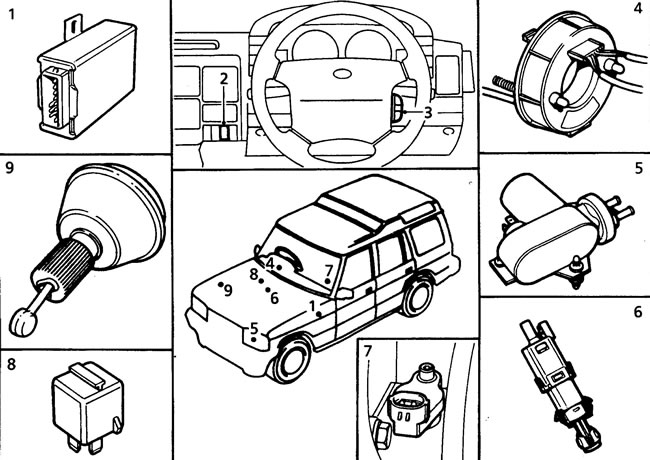


1 - «cruise control» control unit on the left under the front panel, 2 - main switch on the front…

1 - "cruise control" control unit on the left under the front panel, 2 - main switch on the front panel, 3 - control switch on the steering wheel, 4 - slip ring on the steering wheel, 5 - vacuum pump on the booster under the jack, 6 - switch on the brake pedal, 7 - vehicle speed sensor on the transfer case, 8 - neutral lock relay under the trim panel in the lower part of the "A" pillar (only models with automatic transmission), 9 - cruise control system drive in the engine compartment.


1. Start the engine and press the cruise control main switch. Accelerate the car to a speed of approximately 50 km / h, set the control switch to the "set/acc" position and immediately release the switch, remove your foot from the accelerator pedal: the system must maintain the set speed.

2. Hold the switch in the "set/acc" position: the car should accelerate slowly. Once the new desired speed is reached, release the switch.


3. With one touch, move the switch to the "set/acc" position and immediately release it: with one turn on, the speed should increase by approximately 1.6 km/h (with five touches at 8 km/h).

4. Move the control switch to the "res/decel" position: the cruise control system should turn off. As soon as the vehicle speed drops to approximately 55 km/h, move the switch back to the "res/decel" position, immediately release the switch and remove your foot from the accelerator pedal: the vehicle speed should increase to the previously set one (before the start of the speed reduction).

Note: The response of the cruise control system to control signals in diesel and petrol engines is slightly different due to the different characteristics of the engines: when the set speed is below 65 km/h, a slight initial decrease in speed is possible and then the set speed is reached.


5. When you press the brake pedal, the system is switched off. The set mode is reached after moving the switch to the "res/decel" position without pressing the accelerator pedal.

(Original article on the web portal: LRman.ru)

6. Hold the switch in the "res/decel" position: the car should slow down. At speeds below 42 km/h the system should switch off completely.

7. At speeds below 40 km/h, move the switch to the "set/acc" position: the system should not turn on. Press the accelerator pedal and accelerate the car to a speed above 45 km/h, move the switch to the "res/decel" position: the system should turn on and maintain the last set driving mode.


8. Automatic transmission: move the selector to neutral position - the system should switch off.

Manual transmission: press the clutch pedal - the system should disengage.

9. Accelerate to a speed of 80 km/h, disengage the clutch and shift the gearbox into neutral, engage the clutch. Move the switch to the "res/decel" position: the engine speed should exceed 5000 rpm and the cruise control system should turn off, the engine should go to the minimum idle speed.

10. Engage the gear and move the switch to the "res/decel" position, remove your foot from the accelerator pedal: the system should maintain the last set driving mode.

11. Press the main switch: the system will turn off, and all previously made settings will be erased from the control unit memory.

12. Checking the cruise control system components is carried out using the TestBook diagnostic tester.

Attention: on models with automatic transmission incorrect adjustment of the "kick-down" cable (of forced downshift) will cause the cruise control system to fail.


This article is available at russian, bulgarian, belarusian, ukrainian, serbian, croatian, romanian, polish, slovak, hungarian
Article review: Konstantin Nazarov


Previous article
Speed control system («Cruise Control») — description

Current article
Checking the operation of the cruise control system

Next articles
Brake/Clutch Pedal Switches
Main switch
Control switch
Current collector — removal and installation
Cruise control system drive (V8i)
Drive traction control (V8i)
Vacuum pump (Tdi)
Cruise control unit (V8i)


Similar articles from Land Rover repair manuals:
• Cruise control system switches Freelander 2 (2006-2014)
• Checking the exhaust system Freelander 1 (1997-2006)
• Relay: Ignition and fuel system control unit Range Rover 3 (2001-2012)
• Audio system — description and principle of operation Defender 2007+ (2007-2016)

Comments on this article


No comments yet


How much will 38 + 35 =


Discovery 3 
  • General information
  • Using the manual
  • Precautionary measures
  • Service Information
  • Technique
  • Health protection
  • Road test
  • Identification codes
  • Jacking and lifting
  • Maintenance - diesel
  • Maintenance - petrol
  • Chassis
  • Suspension
  • Front suspension
  • Rear suspension
  • Wheels and tires
  • Dynamic suspension
  • Cardan shaft
  • Rear drive axle
  • Front drive axle
  • Front axle axles
  • Rear axle axles
  • Brake system
  • Parking brake
  • Hydraulic brake
  • Vacuum brake booster
  • Anti-lock braking system
  • Steering
  • Steering column
  • Power unit
  • Petrol engine 4.0L
  • Petrol engine 4.4L
  • Diesel engine 2.7L
  • Engine cooling
  • Fuel supply
  • Drive units
  • Launch system
  • Ignition system
  • Emission reduction
  • Air filtration
  • Fuel vapor control
  • Electronic control part
  • Car gearbox
  • Clutch
  • All-wheel drive systems
  • Transfer case
  • Exhaust system
  • Fuel tank and lines
  • Acceleration control
  • Electrical equipment
  • Climate control
  • Instruments and control lamps
  • Battery and charging system
  • Information system
  • Lighting and headlights
  • Power distribution
  • Electronic Function Group
  • Body and coating
  • Body elements
  • Interior and body trim
  • Mirrors and glasses
  • Seats
  • Instrument panel and console
  • Handles and locks
  • Windshield wipers and washers
  • Sunroof and bumpers
  • Safety system
  • Body repairs
  • Repair of front end elements
  • Repair of back elements
  • Side panel repair
  • Frame and body mount

Discovery 1 
  • General information
  • Technical specifications
  • Introduction to manual
  • Troubleshooting
  • Power unit
  • Diesel engine Tdi
  • Petrol engine V8i (3.9 l)
  • Petrol engine V8i (4.0 l)
  • Petrol engine Mpi
  • Reducing harmful emissions
  • Fuel system Tdi
  • Fuel system MFi
  • Fuel system SFi
  • Fuel system MPi (MEMS)
  • Cruise control
  • Cooling system (Tdi)
  • Cooling system (V8i)
  • Cooling system (MPi)
  • Exhaust system
  • Transmission
  • Clutch
  • Manual gearbox R380
  • Manual gearbox LT 77
  • Transfer case LT230T
  • Automatic gearbox
  • Cardan shaft
  • Rear axle
  • Front axle
  • Chassis
  • Steering system
  • Front suspension
  • Rear suspension
  • Brake system
  • Wheels and tires
  • Body and interior
  • Passive safety
  • Doors, locks and windows
  • Exterior body parts
  • Interior trim details
  • Seats
  • Electrical equipment
  • Heating and ventilation
  • Air conditioning
  • Windscreen wipers
  • Starting and charging system
  • Equipment and devices
  • Lighting and headlights


LRman.ru © 2013-2026 | Mobile version | Free Lander | Discovery | Range Rover | Defender | Contacts | | Sitemap |
Car repair and service instructions Land Rover: Freelander, Discovery, Range Rover, Defender
We use cookies to make pages load faster and provide a more user-friendly experience 🍪