Contents: Information and message displays ⇩ Review ⇩ Message Center ⇩ Organizing the Message Center…⇩ Display modes ⇩ Message display priority ⇩ Outside temperature ⇩
Information and message displays
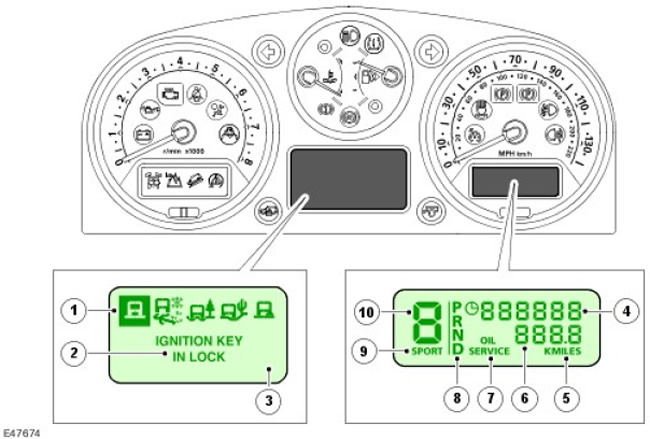
| Item name | Spare part catalog number | Description |
| 1 | - | Terrain Response™ Icons (if applicable) |
| 2 | - | Message display |
| 3 | - | Message Center LCD Display |
| 4 | - | Odometer display |
| 5 | - | Display of units of measurement (miles or kilometers) |
| 6 | - | Odometer display |
| 7 | - | Information LCD display |
| 8 | - | Gear engaged display (for models with manual and automatic transmissions) |
| 9 | - | Gearbox operating mode display (only for models with automatic transmission) |
| 10 | - | Display of the selected gear (for models with manual and automatic transmissions) |
Review
Vehicles may be equipped with standard instrument clusters or enhanced instrument clusters. Both types also vary depending on the market, engine components and other components installed on the vehicle. For more information, refer to Instrument Cluster (413-01)
An instrument cluster is an electronic device that receives analog or digital signals via wires or data buses and uses them to control instruments.
An information display showing the odometer, trip meter, current gear and transmission mode is installed on both instrument cluster types. The message center is provided only on the upgraded instrument clusters.
Message Center
The message center is a liquid crystal display. (LCD display), located in the central lower part of the instrument cluster. The visible area of the LCD display is 71 x 36 mm, the pixel size is 0.54 x 0.54 mm. When the message center is on, its backlight works as follows:
- With the ignition on.
- With the ignition off, all current messages are displayed to the driver.
- When the ignition is off, each current message is displayed in turn for 3 seconds. The message center continues to operate if KEY IN IGNITION messages are displayed. (key in the ignition) or LIGHTS On (lighting is on).
Most messages are generated by the vehicle's subsystem modules when they receive messages via the CAN bus. The instrument cluster identifies the signals and displays the corresponding message in the message center.
Most messages are accompanied by a beep or a series of beeps that are requested by the module generating the message. The beep is emitted by a buzzer located inside the instrument cluster.
The driver can view current status messages of various systems by scrolling through the functions of the trip computer in the repeat playback mode. Scrolling is carried out using the "I" button located at the end of the left multifunction switch of the steering column. When there is a new message, the "I" icon is displayed on the message center display.
Organizing the Message Center Display and Priorities
When the ignition is switched on, the message center display shows a system check message for 3 seconds. If the ignition is switched off during this time, the display goes out.
Once the systems check is complete, the message center display operates as normal for models without Terrain Response™. (display mode 3E, the description of the modes is given in the next section). The display shows: outside air temperature, adaptive cruise control system data (if applicable), as well as on-board computer data. The display format changes when the ignition is switched off or if the instrument cluster detects a condition that requires notification of the driver, such as low washer fluid. Driver actions have the highest priority. If a driver request and a warning need occur simultaneously, the driver request is displayed first.
When a message is received about setting up the adaptive cruise control system, the display switches to 3D or 3e display mode. (the description of the modes is given in the next section). The specified mode is displayed for 3 seconds, after which the display returns to normal mode.
When a Terrain Response™ message is received, the display switches to Mode 3, which shows additional information. The instrument cluster analyzes the information to be displayed and outputs it in the appropriate format.
Display modes
The message center display can operate in one of four modes. The mode used depends on the vehicle's driving conditions and the driver's requirements. A detailed description of the modes is given in the following table:
| Display mode | Description | Format |
| 0 | Empty | In this mode, no messages are displayed. |
| 1 | Informational | User settings display |
| 2 | Preliminary check | Checking systems when ignition is turned on |
| 3 | Normal | Seven formats (A, B, C, D, E, F or G) depending on the technical characteristics of the car and active functions |
Mode 0
This display mode is activated when the ignition is switched off and when the CAN bus goes into standby mode. In this mode, no symbols or icons are displayed on the display. The display exits this mode when the ignition is switched on or when the mode is selected "Customer Settings" (user settings).
Mode 1
This mode displays information for the driver and provides the ability to change certain vehicle settings. The display operates in full-screen format. The driver can configure a number of vehicle functions in various windows. More detailed information is provided in the "User settings" section.
Mode 2: System startup
When the ignition is turned on, the message 'SYSTEM CHECK IN PROGRESS' appears on the display. (system check in progress). This message is displayed for 3 seconds during the indicator lamp check after the ignition is turned on. When the ignition is turned off, the LCD returns to mode 0.
Mode 3
Mode 3 is the normal operating mode of the message center. There are seven different display formats (A through G) that display all possible information and are available on all models, regardless of Terrain Response™. The seven formats are described below:
- A = Display shows: Terrain Response™ mode icon, steering wheel direction icon, trip computer messages/warning messages
- B = Display shows: Terrain Response™ modes (active mode in reverse image), descriptive message of the Terrain Response™ system
- C = Display shows: Active Terrain Response™ mode icon, Terrain Response™ descriptive message, trip computer data/warning messages
- D = Display shows: Active Terrain Response™ icon, outside temperature, text/information/advice/warnings, adaptive cruise control information (if applicable)
- E = Display shows: Outside temperature, adaptive cruise control information (if applicable), text/information/recommendations/warnings
- F = Display shows: Outside temperature, warnings/information
- G = Display shows: Active Terrain Response™ mode icon, outside temperature, text/information/advice/warnings
Message display priority
All messages are assigned a priority, determined depending on the impact on traffic safety and the functionality of the vehicle. New messages are displayed on the display and are accompanied by an audible signal from the instrument cluster buzzer. According to the degree of priority, messages are divided into three groups:
Group 1
This group includes messages that are directly related to the controllability and safety of the vehicle, for example, "ENGINE SYSTEM FAULT" (engine system malfunction). Such messages require immediate action by the driver in response to the message. Group 1 messages are also accompanied by flashing of the corresponding indicator lamps and a continuous audible signal from the instrument cluster buzzer. If several group 1 messages are present at the same time, each message is displayed in turn for 3 seconds.
Group 2
This group includes messages that are not directly related to the controllability and safety of the vehicle, for example, "CHECK BRAKE PADS" (check the brake pads). The driver must take these messages into account and eliminate the cause of their occurrence as soon as possible. Each of these messages is displayed once on the display when the ignition is switched on or when a malfunction occurs within a specified period of time. Messages in this group can be called up by the driver by holding the mileage counter reset button pressed for more than 3 seconds.
Group 3
Messages in this group have the lowest priority, for example, "WASHER FLUID LOW" (low windshield washer fluid level). Some of these messages may only be displayed on the display at the end of the trip, so as not to distract the driver while driving. To notify the driver of the presence of these messages, they are accompanied by an audible signal when the ignition is turned off.
Messages are displayed in the language appropriate to the market configuration. The language can be changed using the Land Rover approved diagnostic system. The following table lists all messages shown on the display, other visible or audible warnings, and a description of the messages.
| Message | Other warnings | Cause | Action |
| SYSTEM CHECK IN PROGRESS (program switching is in progress) | No | Internal diagnostics of the instrument panel | No |
| SYSTEM FAULT (tire pressure monitoring system malfunction) SPECIAL PROGRAMS NOT AVAILABLE (gearbox mode change does not work) | Single beep, message center display shows general program icon | Special Terrain Response programs are not working due to a system malfunction. Exercise caution when driving off-road. | To diagnose faults, connect a Land Rover approved diagnostic system. |
| RECOMMEND LOW RANGE IS SELECTED FOR MUD-RUTS PROGRAM (it is recommended to select low range for the Mud/Ruts program) | The message center display shows the "Mud/Ditches"program icon | The advisory message for the special Terrain Response system program is displayed once during one trip. | Select low range if necessary |
| RECOMMEND STARTING IN 2ND GEAR FOR SLIPPERY CONDITIONS (on slippery roads it is recommended to start driving in 3rd gear) | The message center display shows the icon for the "Grass/Gravel/Snow" program | Advisory message for special program of Terrain Response system (displayed once per trip and only on manual transmission models in low range) | If necessary, engage 2nd gear |
| RECOMMEND STARTING IN 3RD GEAR FOR SLIPPERY CONDITIONS (on slippery roads it is recommended to start driving in 3rd gear) | The message center display shows the "Grass/Gravel/Snow" program icon | Advisory message for special program of Terrain Response system(displayed once per trip and only on manual transmission models in low range) | If necessary, engage 3rd gear |
| RECOMMEND RAISING SUSPENSION TO OFF ROAD HEIGHT IN DEEP MUD-RUTS (it is recommended to raise the suspension to off-road height when driving in deep mud/ditches) | The message center display shows the "Mud/Ditches"program icon | The Terrain Response Mud/Ditches special program advisory message is displayed once per trip with the High Range gear selected. (the suspension rises automatically when low range is selected) | If necessary, manually raise the suspension to the off-road height. |
| Terrain Response SPECIAL PROGRAMS OFF | All five icons are displayed on the message center display. | Advisory message to notify the driver that all special Terrain Response programs are switched off | No |
| SPECIAL PROGRAMS OFF | The message center display shows the general program icon | Advisory message to notify the driver that the current special program has been switched off and the general program has been switched on | No |
| CAUTION! RISK OF GROUNDING WITH SUSPENSION AT NORMAL HEIGHT | The message center display shows the icon of the active special program. | Only displayed if the system would have set the suspension height for off-road driving but the driver manually lowered the suspension (or if the suspension system cannot raise the height of the vehicle) | If possible and necessary, manually raise the suspension to the off-road height. |
| TRAILER CONNECTED OFF ROAD HEIGHT NOT SELECTED AUTOMATICALLY; the suspension height for off-road driving is not set automatically) | The message center display shows the icon of the active special program. | The advisory message is only displayed if the Terrain Response system would have automatically set the suspension height for off-road driving, but the system has detected an electrical load on the trailer socket. | If a trailer or light board is connected, manually raise the suspension to the height specified for off-road driving without compromising safety conditions. If nothing is connected to the trailer socket, check the socket and the Terrain Response system for faults. |
| SELECT LOW RANGE TO ACTIVATE ROCK CRAWL | Beep once, the message center display shows the "Rock Crawl" program icon. | Request to engage Terrain Response's Rocky special program, but transfer case high range is engaged | Shift the transfer case into low range. |
| SAND ("Sand") PROGRAM SELECTED (the "Mud/ditch" program is selected) | The message center display shows the "Sand"program icon | Advisory message: The Terrain Response special program "Sand" has been on for more than two seconds and continues to operate. | No |
| ROCK CRAWL (Rock Crawl) PROGRAM SELECTED ("Dirt/Gravel/Snow" program selected) | The message center display shows the "Rocky Ground" program icon | Advisory message: The Terrain Response system's Rocky Ground special program has been on for more than two seconds and continues to operate. | No |
| GRASS GRAVEL SNOW ("Grass/gravel/snow") PROGRAM SELECTED (the "Dirt/ditch" program is selected) | The message center display shows the "Grass/Gravel/Snow" program icon | Advisory message: Terrain Response Grass/Gravel/Snow special program has been on for more than two seconds and continues to operate | No |
| MUD RUTS PROGRAM SELECTED (Mud/ditches program selected) | The message center display shows the "Mud/Ditches"program icon | Advisory message: The Terrain Response mud/ditch special program has been on for more than two seconds and continues to operate | No |
| GRASS GRAVEL SNOW | The message center display shows the "Grass/Gravel/Snow" program icon | Advisory message: Terrain Response rotary switch set to Grass/Gravel/Snow. Program will activate in 2 seconds | No |
| MUD-RUTS | The message center display shows the "Mud/Ditches"program icon | Advisory message: Terrain Response rotary switch set to Mud/Ditches. Program will activate in 2 seconds | No |
| SAND ("Sand") | The message center display shows the "Sand"program icon | Advisory message: Terrain Response rotary switch set to Sand. Program will start in 2 seconds | No |
| ROCK CRAWL | The message center display shows the "Rocky Ground" program icon | Advisory message: Terrain Response rotary switch set to Rocky Ground. Program will activate in 2 seconds | No |
| PROGRAM CHANGE IN PROGRESS (program switching is in progress) | The message center display shows the icon of the selected special program. | The vehicle's operating conditions prevent the program selection. The cause may be the operation of the ABS or DSC system or electronically controlled differentials | If operating conditions change within 60 seconds, the selected program is activated. If the message is caused by overheating of the electronically controlled differentials, wait until the differentials have cooled down and try selecting the program again. |
| SUSPENSION FAULT NORMAL HEIGHT ONLY (suspension malfunction, only normal suspension height can be selected) | Two beeps, the indicator lamp lights up orange constantly. | A fault has been detected in the air suspension system. Only normal suspension height is available. | To diagnose faults, connect a Land Rover approved diagnostic system. |
| SUSPENSION FAULT MAX SPEED 50 km/h or 30 MPH (suspension malfunction, max. speed 50 km/h) | Two regularly repeated sound signals. The control lamp lights up red continuously. | A serious fault has been detected in the air suspension system. The suspension height cannot be adjusted correctly. | To diagnose faults, connect a Land Rover approved diagnostic system. |
| SLOW DOWN OR VEHICLE WILL RAISE (reduce speed or the suspension height will rise) | Two beeps | If the vehicle speed increases, the suspension height of the vehicle automatically rises from the height in the "Rocky Ground"mode (suspension locked) to normal height. | Make sure that the vehicle speed does not exceed 30 km/h |
| SLOW DOWN OR VEHICLE WILL LOWER (reduce speed or the suspension height will drop) | Two beeps | If the vehicle speed increases, the vehicle's suspension height is automatically lowered from the off-road height to the normal height. | Make sure that the vehicle speed does not exceed 30 km/h |
| SUSPENSION WILL RAISE WHEN SYSTEM COOLED (the suspension will rise after the system cools down) | One beep | The air suspension compressor is cooling down. Lifting will resume after the compressor has cooled down. | No |
| SUSPENSION VEHICLE RAISING SLOWLY (slow suspension lift) | No | The suspension is rising slowly because the reservoir is not full. Only displayed if the rise time exceeds 12 seconds. It does not indicate a system malfunction. | No |
| SUSPENSION IN EXTENDED MODE (the suspension works in extended mode) | One beep | The suspension height cannot be adjusted due to an obstruction. This message may be followed by the following message. Do not jack up the vehicle while the engine is running. The suspension enters extended mode and this message is displayed. | No |
| RESET SUSPENSION HEIGHT IF CLEAR OF OBSTACLE (reset the suspension height if the obstacle is removed) | No | Set the height again if the door is open, or press the switch to exit the advanced mode. | No |
| SUSPENSION LOCKED AT ACCESS HEIGHT | No | "Rocky Ground" mode is selected (suspension locked). | No |
| SUSPENSION ACCESS HEIGHT SELECTED (high range selected) | No | The height is selected to ensure accessibility. | No |
| SUSPENSION NORMAL HEIGHT SELECTED (high range selected) | No | Normal height selected. | No |
| SUSPENSION OFF ROAD HEIGHT SELECTED (high range selected) | No | The suspension height has been selected for off-road driving. | No |
| SUSPENSION REMOTE KEY OPERATION (control suspension with remote control) | Continuous beeping during altitude change. | The air suspension is controlled by a remote control. | No |
| SUSPENSION CLOSE DOOR TO CHANGE HEIGHT (too high speed to change suspension height) | One beep | Changing the height of the air suspension is not possible when the door is open. | Close all doors |
| SUSPENSION SPEED TOO HIGH TO CHANGE HEIGHT (too high speed to change suspension height) | One beep | Altitude change requested but denied due to too high travel speed. | No |
| SUSPENSION FAULT | Two beeps, the indicator lamp lights up orange constantly. | A fault has been detected in the air suspension system. The system may still operate normally. | Connect Land Rover approved diagnostic equipment |
| SUSPENSION START ENGINE TO RAISE VEHICLE (start the engine to raise the suspension) | One beep | The vehicle's suspension can only be raised when the engine is running. | Start the engine |
| KEY BATTERY LOW PLACE IN IGNITION TO CHARGE; to charge, insert the key into the ignition) | No | Remote control battery is low | Insert the key into the ignition to recharge |
| SUSPENSION FAULT VEHICLE LEAN WHEN CORNERING; the car leans on turns) | The control lamp lights up orange constantly | ACE System Functions (if any) are not performed. The car can be driven. | To diagnose faults, connect a Land Rover approved diagnostic system. |
| SUSPENSION FAULT STOP SAFELY (transmission failure; stop the vehicle without compromising safety) STOP ENGINE (suspension malfunction; stop the vehicle without compromising safety and stop the engine) | The indicator lamp flashes red and is accompanied by an audible signal. | Serious component failure, stop vehicle immediately. | To diagnose faults, connect a Land Rover approved diagnostic system. |
| MEMORY 1 SELECTED (high range selected) | Two beeps when selection is complete | Memory system: confirmation of selection completion | No |
| MEMORY 2 SELECTED (high range selected) | Two beeps when selection is complete | Memory system: confirmation of selection completion | No |
| MEMORY 3 SELECTED (high range selected) | Two beeps when selection is complete | Memory system: confirmation of selection completion | No |
| MEMORY 1 STORED (the position of the exterior mirrors is preserved) | One beep | Memory system: driver information storage confirmation | No |
| MEMORY 2 STORED (the position of the exterior mirrors is preserved) | One beep | Memory system: driver information storage confirmation | No |
| MEMORY 3 STORED (the position of the exterior mirrors is preserved) | One beep | Memory system: driver information storage confirmation | No |
| DOOR MIRROR DIP STORED (the position of the exterior mirrors is preserved) | One beep | Memory system: driver information storage confirmation | No |
| DSC SWITCHED OFF (hDC system is off) | The control lamp lights up orange constantly | The DSC system does not work because it is switched off by the driver. | To turn on the system, press the DSC switch. |
| HDC FAULT SYSTEM NOT AVAILABLE (gearbox mode change does not work) | One beep | System failure; drive with caution and avoid sharp descents. | To diagnose faults, connect a Land Rover approved diagnostic system. |
| HDC TEMPORARILY NOT AVAILABLE (gearbox mode change does not work) SYSTEM COOLING (HDC system is temporarily out of service; the system is cooling) | The indicator light flashes green | The HDC system is switched off while the brake system cools down. | Wait until this message disappears before descending. |
| HDC NOT AVAILABLE SPEED TOO HIGH (excessive pressure in the rear right tire) | The indicator light flashes green | HDC system not working due to exceeding maximum permissible speed (the maximum operating speed of the HDC system is 50 km/h, the maximum speed at which the HDC system can be activated is 80 km/h) | No |
| HDC NOT AVAILABLE (gearbox mode change does not work) IN THlS GEAR (hDC system cannot be engaged in this gear) | The indicator light flashes green | HDC is not active because an inappropriate gear is selected (HDC operates in High Range in 1st and Reverse on manual transmission models and in 1st, R and D CommandShift™ gears on automatic transmission models. In Low Range, HDC operates in all gears on manual and automatic transmissions). | No |
| HDC SWITCHED OFF (hDC system is off) | One beep (if the HDC system is disabled by the Terrain Response system or if the maximum permitted speed of 80 km/h is exceeded) | The HDC system is switched off by the driver, the Terrain Response system or when the maximum permitted speed is exceeded. | No |
| FUEL TANK CAP LOOSE OR MISSING (the fuel tank cap is not closed tightly or is missing) | No | For North American countries only - DMTL pump cannot pressurize the system | Tighten or replace the cap. Check the system for leaks. |
| ENGINE SYSTEM FAULT | MIL indicator light is on | The ECM has detected a fault in the engine management system. | To diagnose faults, connect a Land Rover approved diagnostic system. |
| HIGH ENGINE SPEED FOR COOLING (high engine crankshaft speed for cooling) | No | The idle speed is increased to ensure operation of the air conditioning compressor | No |
| TRANSMISSION FAULT LIMITED GEARS AVAILABLE; some transmissions are not working) | No | Notifies the driver that the automatic transmission is malfunctioning and this may affect the vehicle's handling | To diagnose faults, connect a Land Rover approved diagnostic system. |
| TRANSMISSION FAULT (gearbox malfunction) | No | Notifies the driver that the automatic transmission is faulty | To diagnose faults, connect a Land Rover approved diagnostic system. |
| TRANSMISSION FAULT AND OVERHEAT | No | Notifies the driver of a malfunction and high temperature of the gearbox. | To diagnose faults, connect a Land Rover approved diagnostic system. |
| TRANSMISSION OVERHEAT SLOW DOWN; slow down) | No | Notifies the driver of high transmission temperature. Reduce speed or stop the vehicle to speed up transmission cooling. | Check the gearbox for faults |
| REVERSE GEAR SELECTED (high range selected) | No | Notifies the driver when reverse gear is engaged - Japan models only | No |
| LOW RANGE SELECTED (high range selected) | One beep. Low range indicator lamp flashes during range shift. Indicator lamp stays on when shift is complete. | Notifies the driver that the transfer case is in low range. | No |
| HIGH RANGE SELECTED (high range selected) | One beep. Low range indicator lamp goes out. | Notifies the driver that the transfer case high range is engaged. | No |
| SPEED TOO HIGH FOR RANGE CHANGE (select neutral to change range) | One beep | The driver requested a range change while the vehicle was moving at high speed. | Reduce speed to 40 km/h (25 mph) for automatic transmission models or 20 km/h (12 mph) for manual transmission models |
| SELECT NEUTRAL FOR RANGE CHANGE (select neutral to change range) | One beep | Notifies the driver that range changes are not possible unless the gearshift lever is in neutral. | No |
| PARK LOCK FAILURE APPLY HANDBRAKE (PARK BRAKE - North American countries only) (failure to lock parking position; use the parking brake) | One beep of 1 sec duration every 3 sec. | The automatic transmission park position lock function does not operate because the transfer case is not in high or low range. The transfer case control module is not transmitting signals on the CAN bus, or the transfer case lever is in neutral. | To diagnose faults, connect a Land Rover approved diagnostic system. |
| TRANSMISSION OVERHEAT SLOW DOWN; slow down) | One beep | The rear differential temperature has reached or is approaching the overheating threshold. | No |
| TRANSMISSION RANGE CHANGE NOT AVAILABLE (gearbox mode change does not work) | No | A fault has occurred that prevents the transfer case from changing range. | To diagnose faults, connect a Land Rover approved diagnostic system. |
| TRANSMISSION FAULT TRACTION REDUCED; traction force is reduced) | One beep | The transfer case control module has stopped sending messages on the CAN bus. The center differential is open by default. The message is also displayed if there is a fault with the electronically controlled rear differential. | To diagnose faults, connect a Land Rover approved diagnostic system. |
| TRANSMISSION FAULT STOP SAFELY; stop the car without violating safety) | No | There is a fault with the electronic rear differential. Stop the vehicle as soon as possible. | To diagnose faults, connect a Land Rover approved diagnostic system. |
| CRUISE CONTROL CANCELLED (cruise control system is off) | No | The driver turned off the adaptive cruise control system | No |
| CHECK ALL TYRE PRESSURES | No | Advisory message: The pressure in one of the tires has dropped to the first threshold value. | No |
| TYRE PRESSURES TOO HIGH (excessive pressure in the rear right tire) | Short beep, indicator lamp lights up orange | Check your tire pressure | Adjust the tire pressure to the specified value. |
| TYRE PRESSURES VERY LOW (excessively low pressure in the rear right tire) | Short beep, indicator lamp lights up orange | Check your tire pressure | Adjust the tire pressure to the specified value. |
| FRONT LEFT TYRE PRESSURE VERY LOW (excessively low pressure in the rear right tire) | A short sound signal, the control lamp lights up orange. | The tire pressure has dropped to the threshold value. | Adjust the tire pressure to the specified value. |
| FRONT RIGHT TYRE PRESSURE VERY LOW (excessively low pressure in the rear right tire) | A short sound signal, the control lamp lights up orange. | The tire pressure has dropped to the threshold value. | Adjust the tire pressure to the specified value. |
| REAR LEFT TYRE PRESSURE VERY LOW (excessively low pressure in the rear right tire) | A short sound signal, the control lamp lights up orange. | The tire pressure has dropped to the threshold value. | Adjust the tire pressure to the specified value. |
| REAR RIGHT TYRE PRESSURE VERY LOW (excessively low pressure in the rear right tire) | A short sound signal, the control lamp lights up orange. | The tire pressure has dropped to the threshold value. | Adjust the tire pressure to the specified value. |
| FRONT LEFT TYRE PRESSURE TOO HIGH (excessive pressure in the rear right tire) | No | Tire pressure too high, threshold value reached. | Adjust the tire pressure to the specified value. |
| FRONT RIGHT TYRE PRESSURE TOO HIGH (excessive pressure in the rear right tire) | No | Tire pressure too high, threshold value reached. | Adjust the tire pressure to the specified value. |
| REAR LEFT TYRE PRESSURE TOO HIGH (excessive pressure in the rear right tire) | No | Tire pressure too high, threshold value reached. | Adjust the tire pressure to the specified value. |
| REAR RIGHT TYRE PRESSURE TOO HIGH (excessive pressure in the rear right tire) | No | Tire pressure too high, threshold value reached. | Adjust the tire pressure to the specified value. |
| TYRE PRESSURE MONITORING SYSTEM FAULT (tire pressure monitoring system malfunction) | A short beep sounds and the indicator lamp lights up continuously in orange. During subsequent ignition cycles, a beep sounds and the indicator lamp lights up continuously in orange. | There is a malfunction in the TPMS system. Perform a functional diagnostic of the system. | To diagnose faults, connect a Land Rover approved diagnostic system. |
| TYRE PRESSURE MONITORING SET FOR HEAVY LOAD (the tire pressure monitoring system has been set to high load mode) | None of the instrument cluster warning lights are on. The TPMS switch status LED is on. | The TPMS system is set by the driver to a high load mode. | No |
| TYRE PRESSURE MONITORING SET FOR LIGHT LOAD (tire pressure monitoring system low load mode selected) | No | Normal operating mode of the TPMS system. | No |
| CHECK SPARE TYRE PRESSURE (check the pressure in the spare tire) | No | The pressure in the spare tire has dropped to the threshold value. | Adjust the tire pressure to the specified value. |
| FRONT LEFT TYRE PRESSURE NOT MONITORED (rear right tire pressure not controlled) | A short beep sounds and the indicator lamp lights up continuously in orange. During subsequent ignition cycles, a beep sounds and the indicator lamp lights up continuously in orange. | There may be a loss of radio frequency data transmission or a faulty sensor battery. | To diagnose faults, connect a Land Rover approved diagnostic system. |
| FRONT RIGHT TYRE PRESSURE NOT MONITORED (rear right tire pressure not controlled) | A short beep sounds and the indicator lamp lights up continuously in orange. During subsequent ignition cycles, a beep sounds and the indicator lamp lights up continuously in orange. | There may be a loss of radio frequency data transmission or a faulty sensor battery. | To diagnose faults, connect a Land Rover approved diagnostic system. |
| REAR LEFT TYRE PRESSURE NOT MONITORED (rear right tire pressure not controlled) | A short beep sounds and the indicator lamp lights up continuously in orange. During subsequent ignition cycles, a beep sounds and the indicator lamp lights up continuously in orange. | There may be a loss of radio frequency data transmission or a faulty sensor battery. | To diagnose faults, connect a Land Rover approved diagnostic system. |
| REAR RIGHT TYRE PRESSURE NOT MONITORED (rear right tire pressure not controlled) | A short beep sounds and the indicator lamp lights up continuously in orange. During subsequent ignition cycles, a beep sounds and the indicator lamp lights up continuously in orange. | There may be a loss of radio frequency data transmission or a faulty sensor battery. | To diagnose faults, connect a Land Rover approved diagnostic system. |
| PARK BRAKE FAULT TO HOLD VEHICLE REMOVE KEY THEN APPLY PARK BRAKE; to hold the vehicle, remove the key and then apply the parking brake) | The orange parking brake indicator light is on continuously and the red indicator light is flashing | Loss of CAN bus data transmission or no vehicle speed signal | The parking brake will not engage in the normal manner until the key is removed from the ignition switch and a request to engage is received from the parking brake switch. |
| PARK BRAKE FAULT SYSTEM NOT FUNCTIONAL; the auto release function does not work) | The red parking brake indicator light is flashing | There may be a malfunction of the electric motor when the driver attempts to engage the parking brake using the switch | To diagnose faults, connect a Land Rover approved diagnostic system. |
| PARK BRAKE BEDDING CYCLE ACTIVE (parking brake burn-in cycle active) | The red parking brake indicator light is flashing | The dealership's technician initiated the bedding-in process of the parking brake pads. | Follow the brake pad bedding instructions in your repair manual. |
| CAUTION! PARK BRAKE APPLIED (attention! Parking brake engaged) | The red parking brake indicator light is constantly on | The parking brake is applied while the vehicle is moving | Do not use the parking brake while the vehicle is moving unless absolutely necessary. |
| PARK BRAKE FAULT | The orange parking brake indicator light is constantly on | A possible malfunction of the parking brake system has been detected. | Follow the message instructions |
| PRESS FOOT BRAKE AND PARK BRAKE SWITCH TO RELEASE (to release, press the brake or clutch pedal and the parking brake switch) | No | The parking brake cannot be released until the brake pedal is depressed. | Follow the message instructions |
| PRESS FOOT BRAKE OR CLUTCH AND PARK BRAKE SWITCH TO RELEASE (to release, press the brake or clutch pedal and the parking brake switch) | No | The parking brake cannot be released until the brake or clutch pedal is depressed. | Follow the message instructions |
| PARK BRAKE FAULT AUTO RELEASE NOT FUNCTIONAL; the auto release function does not work) | The orange parking brake indicator light is constantly on | Automatic release function when starting off does not work | To release, press the brake pedal and the parking brake switch. |
| PARK BRAKE OFF (OFF) LIFT SWITCH TO APPLY (parking brake off); to activate, lift the switch) | The red parking brake indicator light is flashing | Emergency parking brake release detected | Pull the parking brake switch to engage the parking brake. |
| LOW WASHER FLUID (low windshield washer fluid level) | One beep when the ignition is turned on. | The volume of windshield washer fluid is less than 1 liter. | Add water and windshield washer fluid concentrate to the reservoir |
| HEADLAMP OFF DELAY XX SEC (headlights off delay xx seconds) | No | The driver selected the function of delaying the switching off of headlights after the ignition is switched off | No |
| LOW COOLANT LEVEL (low coolant level) | No | The coolant level in the expansion tank is below the recommended level. | Check for leaks in the cooling system and top up the fluid to the required level. |
| DRIVER'S DOOR OPEN (the rear right door is open) | No | The driver's door is open or not closed properly | No |
| LEFT REAR DOOR OPEN (the rear right door is open) | No | The rear left door is open or not closed properly. | No |
| FRONT PASSENGER DOOR OPEN (the rear right door is open) | No | The front passenger door is open or not closed properly. | No |
| RIGHT REAR DOOR OPEN (the rear right door is open) | No | The rear right door is open or not closed properly. | No |
| TAILGATE OPEN (the hood is open) | No | The tailgate is open or not closed properly | No |
| BONNET OPEN (the hood is open) | No | The hood is open or not closed tightly | No |
| SETTINGS | No | The driver has activated the "User Settings" menu | Use the steering wheel switches to check and change settings or press the trip computer button to exit the menu. |
| AUTOMATIC MODE (automatic mode) | No | The driver turned on the interior lighting | No |
| DPFFULL(DPF FULL) | No | The Diesel Particulate Filter (DPF) control software has determined that the DPF is full. | To regenerate the DPF, the driver must follow the instructions in the owner's manual. |
| DPF FULL (DPF FULL) VISIT DEALER(CONTACT DEALER) | No | The DPF software has determined that the DPF is still blocked after the driver has performed a regeneration-targeted drive cycle. | The dealer must use a Land Rover approved diagnostic system and perform the diagnostic procedure to regenerate the DPF. |
Outside temperature
The outside air temperature is measured by a sensor located behind the front grille on the right side of the hood latch plate. The sensor is connected to the HEVAC module. The HEVAC module transmits outside temperature data via the CAN bus, which is used by the instrument cluster to display the current outside temperature.
The outside temperature is displayed in the upper right corner of the LCD message center. The temperature is displayed on the display until there is a need to display any system information in the message center. After the system information is displayed, the outside temperature is displayed again. Depending on the market, the temperature is displayed in°F or°C. The driver can also change the units in the User Settings menu.
Cold Weather Warning
When the outside temperature is displayed on the display and if it drops to 4°C or lower, the cold weather warning icon is displayed on the display. The icon is represented by a snowflake and flashes 5 times at a frequency of 2 Hz. The instrument cluster buzzer sounds to warn the driver. After the fifth flash, the icon is displayed on the display continuously instead of "EXT" until the temperature reading reaches 6°C or higher.
The cold weather warning is displayed only once per ignition cycle. However, if the temperature rises to 6°C or more and then drops to 4°C or less during the same ignition cycle, the warning will be repeated.
If the display changes to a mode where the outside temperature value is not displayed while the warning is displayed, the cold weather warning is cancelled.
Comments on this article